
Tech Resources I love!
Preparing for technical interviews
Ace Every Stage of Your Next Technical Interview with these curated resources
Courses on Cloud, Data and AI
Step by step courses with hands-on experience and projects
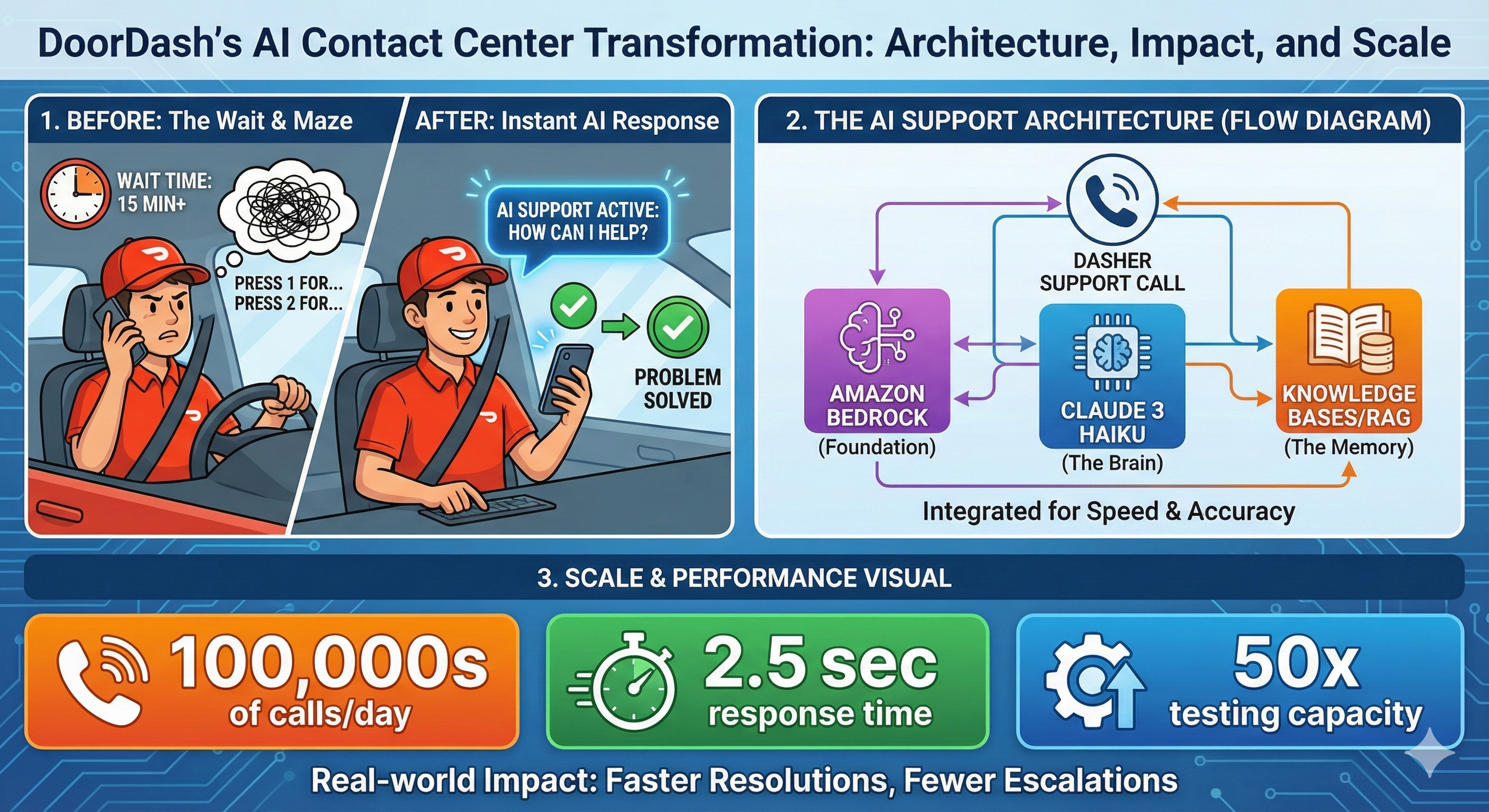
How DoorDash Built a Voice AI Contact Center That Actually Works
How DoorDash Built a Voice AI Contact Center That Actually Works
Jan 17
Picture this: You're a DoorDash driver—a Dasher, as they're called—navigating traffic while trying to find a customer's apartment. Something goes wrong with the app. You need help. Now.
You're not going to pull over and type out a detailed support message. You're going to call.
This is the reality DoorDash faced when they decided to overhaul their customer support. Hundreds of thousands of calls every single day from Dashers, merchants, and customers—many of them needing answers while literally on the move. And when you're driving for a living, every minute on hold is money lost.
So how do you build an AI support system that doesn't feel like talking to a brick wall? That's exactly what DoorDash figured out, and there are some lessons here that anyone building AI applications should pay attention to.
Voice AI Is Harder Than Text
Most companies that implement AI chatbots start with text. Makes sense—it's easier to prototype, easier to debug, and users can wait a few seconds for a response without feeling like something's broken.
Voice is a completely different beast.
When you're on a phone call, even a two-second pause feels awkward. Three seconds? You start wondering if the call dropped. Five seconds? You've already hung up and called back.
DoorDash already had a decent self-service system running on Amazon Connect with Amazon Lex—the kind of "press 1 for account issues, press 2 for payment questions" setup you've probably used a hundred times. It was working. They'd reduced agent transfers by 49% and saved about $3 million a year in operational costs.
But "working" isn't the same as "great." Most calls were still getting routed to human agents. Dashers were spending too much time waiting for help when they needed to be back on the road making deliveries.
The question wasn't whether to use generative AI. The question was: how do you make it fast enough for voice?
Why Amazon Bedrock?
DoorDash partnered with AWS through their Generative AI Innovation Center—a program where AWS pairs companies with their AI experts to build production-ready solutions. Not a proof of concept. Not a demo. Something that could handle hundreds of thousands of real calls.
They chose Amazon Bedrock as their foundation, and the reasoning is worth understanding.
For beginners: Bedrock is essentially Amazon's "one-stop shop" for accessing large language models. Instead of managing your own infrastructure or figuring out how to deploy models, you get a managed service with multiple AI models available through a single API. Think of it like what AWS did for servers, but for AI models.
For practitioners: The real value here isn't just convenience. Bedrock gives you access to multiple foundation models—including Anthropic's Claude family—without vendor lock-in. You can experiment with different models, swap them out, and fine-tune your approach without rebuilding your entire architecture. DoorDash reported a 50% reduction in development time just from using Bedrock instead of building custom integrations.
For architects: The security story matters here too. Bedrock provides built-in encryption and ensures that customer data stays within your application boundaries. DoorDash explicitly noted that no personally identifiable information gets passed to the generative AI components—the architecture enforces this separation.
Getting the Speed Right with Claude 3 Haiku
Remember that latency issue? This is where model selection becomes critical.
DoorDash tested multiple models and landed on Anthropic's Claude 3 Haiku for their voice application. The result: response latency of 2.5 seconds or less.
Now, 2.5 seconds might sound like a lot if you're used to text chatbots that respond almost instantly. But remember—this isn't just generating a response. The system needs to:
Transcribe the caller's speech to text
Process the request and understand the intent
Search the knowledge base for relevant information
Generate an appropriate response
Convert that response back to speech
All of that in under 2.5 seconds. That's actually impressive.
But Haiku wasn't just chosen for speed. Claude models have specific capabilities around hallucination mitigation, prompt injection detection, and identifying abusive language. When you're building a customer-facing voice system that handles hundreds of thousands of calls daily, you really don't want your AI confidently giving wrong information or being manipulated by bad actors.
The RAG Architecture
Let's get into how this actually works.
DoorDash implemented Retrieval-Augmented Generation (RAG) using Knowledge Bases for Amazon Bedrock. If you're not familiar with RAG, here's the gist:
Instead of asking the AI model to answer questions purely from what it learned during training, you give it access to your company's actual documentation. When a Dasher asks "how do I update my payment information?", the system first searches DoorDash's help center for relevant articles, then feeds that context to Claude along with the question. The model generates an answer based on your actual, up-to-date documentation—not whatever was in its training data.
Why this matters:
Accuracy: The AI can only answer based on your approved content. If your payment process changed last week, you update the help center, and the AI immediately gives the right answer.
Controllability: You're not hoping the model "knows" the right answer. You're ensuring it does.
Auditability: You can trace exactly which documents informed any given response.
Knowledge Bases for Amazon Bedrock handles the messy parts—ingesting documents, creating embeddings, managing the retrieval workflow, and augmenting prompts. DoorDash didn't have to build custom integrations or manage their own vector database. They pointed the system at their help center and let the managed service handle the plumbing.
The Testing Framework That Made It Possible
This part caught my attention and doesn't get talked about enough.
Before this project, DoorDash's contact center team had to pull actual agents off the support queue to manually test new features. They'd have agents call in, go through scenarios, and report back. It was slow, expensive, and couldn't scale.
Working with the AWS team, they built an automated testing framework using Amazon SageMaker. The system can now run thousands of tests per hour—a 50x increase from their previous capacity. More importantly, it doesn't just check if the AI responded; it semantically evaluates whether responses are actually correct compared to ground-truth answers.
This is the kind of infrastructure investment that separates companies that successfully deploy AI from those that launch something broken and never recover user trust.
For teams building similar systems: Don't underestimate testing. Your AI might work perfectly in demos but fail spectacularly on edge cases. Build evaluation frameworks early. Test at scale. Have a way to measure quality beyond "did it respond?"
The Results
Let's look at the numbers DoorDash shared:
Hundreds of thousands of calls per day handled by the generative AI solution
Thousands fewer escalations to live agents daily
Fewer agent tasks required to resolve support inquiries
8 weeks from kickoff to live A/B testing
Those are real, material improvements. The solution rolled out to all Dashers in early 2024 and has been running in production since.
What I find more interesting is what they're planning next.
DoorDash mentioned they're working on expanding the knowledge bases (more topics the AI can handle) and integrating with their "event-driven logistics workflow service." Translation: the AI won't just answer questions; it'll take actions on behalf of users.
Imagine calling support and instead of just hearing "you can update your payment method in settings," the AI says "I've updated your payment method to the new card. You should see it reflected now."
That's a fundamentally different product. And it's where this technology is heading.
Takeaways
Whether you're building AI applications, evaluating vendors, or just trying to understand where this technology is going, a few things stand out:
Model selection is architecture. Choosing Claude 3 Haiku wasn't just about speed—it was about the full package of latency, accuracy, safety features, and cost. Different use cases need different models.
RAG isn't optional for enterprise. If you're building customer-facing AI that needs to give accurate, current information, you need retrieval-augmented generation. Relying purely on model training data is asking for trouble.
Voice AI is harder than text AI. The latency requirements alone change everything. If you're thinking about voice applications, budget more time and expect different trade-offs.
Testing infrastructure pays dividends. DoorDash's investment in automated evaluation let them iterate faster and deploy with confidence. This is table stakes for production AI.
Managed services accelerate deployment. A 50% reduction in development time is significant. Sometimes the right move is to pay for infrastructure that lets you focus on your actual product.
Where This Is All Heading
There's a pattern emerging in how successful companies deploy generative AI: they start with high-volume, repetitive tasks where the cost of errors is manageable and the improvement potential is obvious.
Customer support checks all those boxes. Hundreds of thousands of daily interactions. Many questions are routine ("how do I...?"). The existing baseline (hold music) is so bad that even imperfect AI feels like an improvement. And humans remain in the loop for complex issues.
DoorDash didn't try to replace their entire support operation with AI. They augmented it. The generative AI handles the straightforward stuff, which frees up human agents to focus on complex problems that actually need human judgment.
That's not the flashiest vision of AI, but it might be the most realistic one. Incremental improvements that compound. Real cost savings that fund further development. Gradual expansion of capabilities as the technology matures.
Not every AI story needs to be revolutionary. Sometimes, "it works, it saves money, and customers like it better" is exactly the story worth telling.

How NVIDIA GPUs Works Behind The Scene
2. The CUDA Model
How do we tell thousands of cores what to do without chaos? We use CUDA (Compute Unified Device Architecture).
When a developer writes code (the Host Code), they write specific functions called Kernels. When a Kernel is launched, the GPU organizes the work into a strict hierarchy to manage the massive parallelism:
Grid: The entire problem space.
Thread Blocks: The grid is divided into blocks.
Warps: This is a crucial hardware concept. Threads are executed in groups of 32 called "Warps." All 32 threads in a warp execute the same instruction at the same time.
Threads: The individual workers processing the data.
3. The Architecture (Ampere, Hopper)
If you zoomed into the silicon, you would see the Streaming Multiprocessors (SMs). These are the workhorses of the GPU. Inside an SM, you find specialized cores for different jobs:
CUDA Cores: For general-purpose floating-point math (FP32, FP64, INT32).
RT Cores: Specialized for Ray Tracing (calculating how light bounces in video games).
Tensor Cores: The "AI Magic" (more on this below).
The Memory Hierarchy
Speed isn't just about processing; it's about feeding the beast. If the cores are waiting for data, they are useless. NVIDIA solves this with a tiered memory architecture:
Global Memory (HBM): High Bandwidth Memory. Massive storage, but slower to access.
L2 Cache: Shared across the GPU.
L1 Cache / Shared Memory: Extremely fast memory located inside the SM, shared by thread blocks.
Registers: The fastest memory, unique to each thread.
4. The Math of AI
Aleksa Gordic has written deep dive into Matrix Multiplication (MatMul) and how it intersects with the physical hardware. At their core, Deep Learning and Large Language Models are essentially giant grids of numbers interacting with one another. You are taking massive amounts of input data and constantly comparing and combining it with the model's learned "weights."
If you try to perform this work on a standard CPU, it is like a librarian trying to organize thousands of books by picking up one book, walking it to the shelf, placing it, and then walking all the way back for the next one. The CPU processes these interactions sequentially—handling one tiny piece of data at a time. It is a painstakingly slow bottleneck.
NVIDIA’s Tensor Cores were designed specifically to break this bottleneck. While a standard core calculates one number at a time, a Tensor Core grabs entire blocks of data and fuses them together in a single instant. By chopping the massive mountain of data into small, manageable "tiles" and keeping those tiles in the chip’s ultra-fast memory, Tensor Cores can churn through AI training tasks exponentially faster than older hardware could ever hope to.
5. The Software Stack
Hardware is essentially a paperweight without software. The sketch outlines the stack that makes this accessible:
NVIDIA Driver & Hardware: The physical foundation.
CUDA Toolkit: The compiler and tools developers use.
Libraries (cuBLAS, cuDNN, TensorRT): Pre-optimized math libraries. Note: cuBLAS is literally the "Basic Linear Algebra Subprograms" library—it handles the MatMul for you so you don't have to write raw CUDA code.
Applications: PyTorch, TensorFlow, Graphics, and HPC apps sit at the top.
Conclusion
The success of AI is the GPU engineering. It comes down to:
Massive Parallelism: Doing thousands of things at once rather than one thing quickly.
Memory Hierarchy: Keeping data as close to the cores as possible to maximize throughput.
Specialization: Using Tensor Cores to accelerate the specific math (Matrix Multiplication) that underpins all Deep Learning.
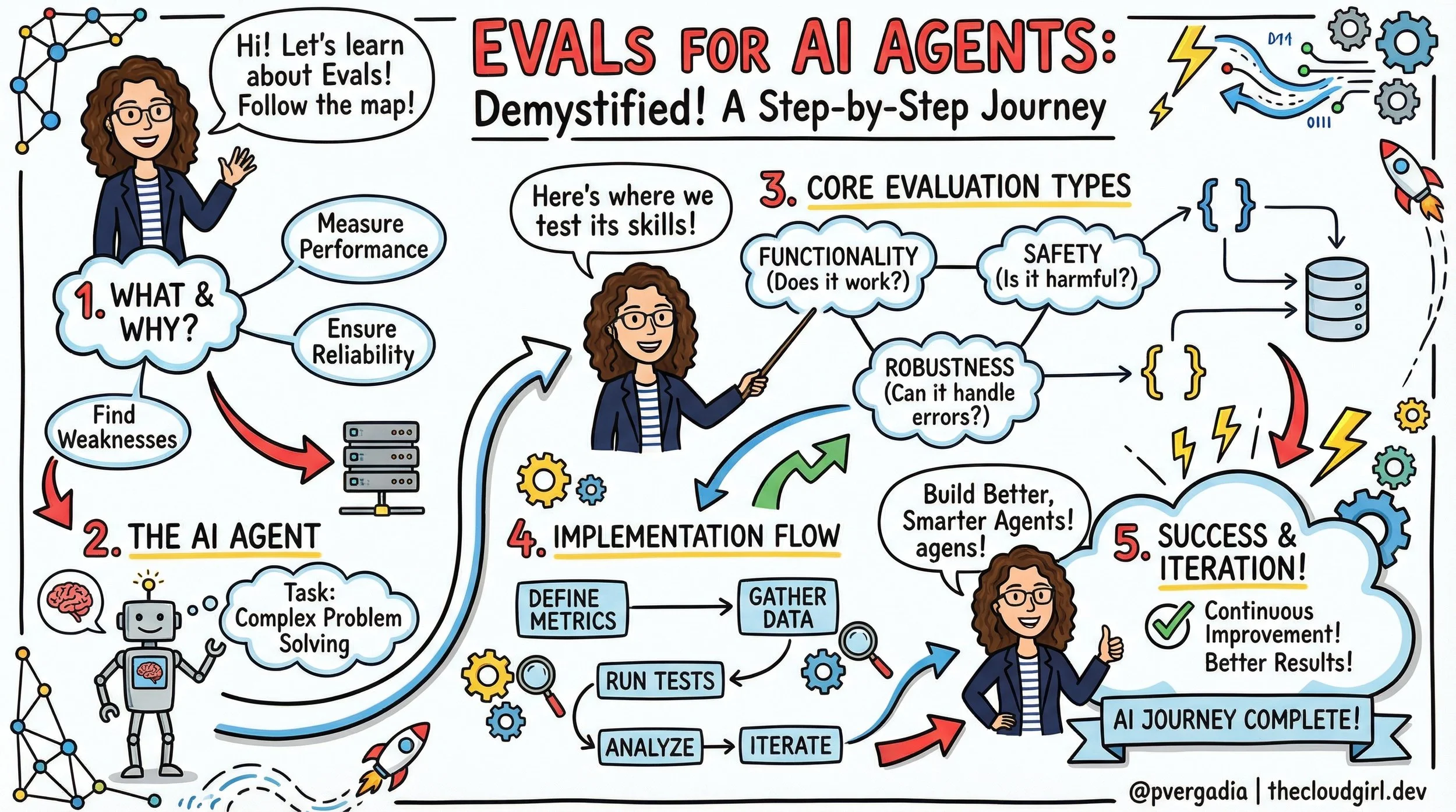
Demystifying Evals: How to Test AI Agents Like a Pro
Demystifying Evals: How to Test AI Agents Like a Pro
Written By Priyanka Vergadia
If you’ve moved from building simple RAG pipelines to autonomous AI agents, you’ve likely hit a wall: evaluation.
With a standard LLM call, you have a prompt and a response. It’s easy to grade. But an agent operates over multiple turns, calls tools, modifies environments, and corrects its own errors. How do you test a system that is non-deterministic and whose "answer" isn't just text, but a side effect in a database or a file system?
Anthropic recently shared their internal playbook on agent evaluation. Here is the developer’s guide to building rigorous, scalable evals for AI agents.
The Flying Blind Problem
When you first build an agent, you probably test it manually ("vibes-based" testing). This works for prototypes but breaks at scale. Without automated evals, you are flying blind. You can't distinguish real regressions from noise, and you can't confidently swap in a new model (like moving from Claude 3.5 Sonnet to a newer version) without weeks of manual re-testing.
The Golden Rule: Start building evals early. They force you to define what "success" actually looks like for your product.
IMAGE
The Anatomy of an Agent Eval
An agent evaluation is more complex than a standard unit test. It generally consists of seven key components:
The Task: The specific scenario or test case (e.g., "Fix this GitHub issue").
The Harness: The infrastructure that sets up the environment and runs the agent loop.
The Agent Loop: The model interacting with tools, reasoning, and the environment.
The Transcript: The full log of tool calls, thoughts, and outputs.
The Outcome: The final state of the environment (e.g., Is the file edited? Is the row in the DB?).
The Grader: The logic that scores the transcript or the outcome.
The Suite: A collection of tasks grouped by capability (e.g., "Refund Handling" suite).
3 Strategies for Grading Agents
You cannot rely on just one type of grader. A robust system uses a "Swiss Army Knife" approach:
1. Code-Based Graders (The "Unit Test")
These are fast, cheap, and deterministic.
Best for: Verifying outcomes.
Examples: Regex matching, static analysis (linting generated code), checking if a file exists, running a unit test against generated code.
Pros: Zero hallucinations, instant feedback.
Cons: Can be brittle; misses nuance.
2. Model-Based Graders (LLM-as-a-Judge)
Using an LLM to grade another LLM.
Best for: Assessing soft skills or reasoning.
Examples: "Did the agent adopt a polite tone?", "Did the agent logically deduce the error before fixing it?"
Pros: flexible; handles open-ended output.
Cons: Non-deterministic; can be expensive; requires calibration.
3. Human Graders (The Gold Standard)
Best for: Calibrating your Model-Based graders and final QA.
Strategy: Use humans to grade a subset of logs, then tune your LLM judge to match the human scores.
Architecting Evals by Agent Type
Different agents require different evaluation architectures.
For Coding Agents
Coding agents are actually the "easiest" to evaluate because code is functional.
The Setup: Give the agent a broken codebase or a feature request.
The Check: Run the actual test suite. If the tests pass, the agent succeeded.
Advanced: Use Transcript Analysis to check how it solved it. Did it burn 50 turns trying to guess a library version? Did it delete a critical config file? (Use an LLM grader to review the diff).
For Browser/GUI Agents
These are tricky because the output is actions on a screen.
Token Efficiency vs. Latency: Extracting the full DOM is accurate but token-heavy. Screenshots are token-efficient but slow.
The Check: Don't just check the final URL. Check the backend state. If the agent "bought a laptop," check the mock database to see if the order exists.
Handling Non-Determinism (pass@k)
Agents are stochastic. Running a test once isn't enough. Anthropic recommends borrowing metrics from code generation research:
pass@1: Did the agent succeed on the first try? (Critical for cost-sensitive tasks).
pass@k: If we run the agent $k$ times (e.g., 10 times), what is the probability at least one run succeeds?
pass^k: The probability that all $k$ trials succeed. (Use this for regression testing where consistency is paramount).
The Developer's Checklist: How to Start
If you have zero evals today, follow this progression:
Start with "Capability Evals": Pick 5 tasks your agent fails at. Write evals for them. This is your "hill to climb."
Add "Regression Evals": Pick 5 tasks your agent succeeds at. Write evals to ensure you never break them.
Read the Transcripts: Don't just look at the PASS/FAIL boolean. Read the logs. If an agent failed, was the instructions unclear? Did the grader hallucinate?
Watch for Saturation: If your agent hits 100% on a suite, that suite is no longer helping you improve capabilities. It has graduated to a pure regression test. You need harder tasks.
Tooling
You don't always need to build from scratch. The ecosystem is maturing:
Harbor: Good for containerized/sandbox environments.
Promptfoo: Excellent for declarative, YAML-based testing.
LangSmith / Braintrust: Great for tracing and online evaluation.
Building agents without evals is like writing code without a compiler. You might feel like you're moving fast, but you'll spend twice as long debugging in production. Start small, verify outcomes, and automate the loop.
Priyanka Vergadiahttps://thecloudgirl.dev
The 5 AI Engineer Team Roles
EDIT SITE FOOTER
Software 3.0: Intent Over Syntax
Software 3.0: Intent Over Syntax
Jan 11
Written By Priyanka Vergadia
My job is to guide the Fortune 100 CTOs on redefining their AI-powered Software Development Life Cycle (SDLC), and I can tell you this: the transformation is never just about the coding. It is fundamentally about the humans—the developers evolving into architects, the designers prompting prototypes into existence, and the project managers shifting from timeline guardians to outcome owners. It is about re-engineering your entire process, evolving your talent stack, and rigorously defining business outcomes in a world of infinite leverage.
But amidst the strategy, one thing is palpable in every boardroom I enter, and that is the fear. It is the fear that in our rush to embrace "vibe coding" and autonomous agents, we are trading structural integrity for speed—building "black box" systems that work perfectly today, but that no human on the team truly understands how to fix tomorrow. When I sit in these boardrooms, the question isn't "Can AI write this code?" We know it can. The question is, "Who owns the outcome when the AI gets it wrong?"
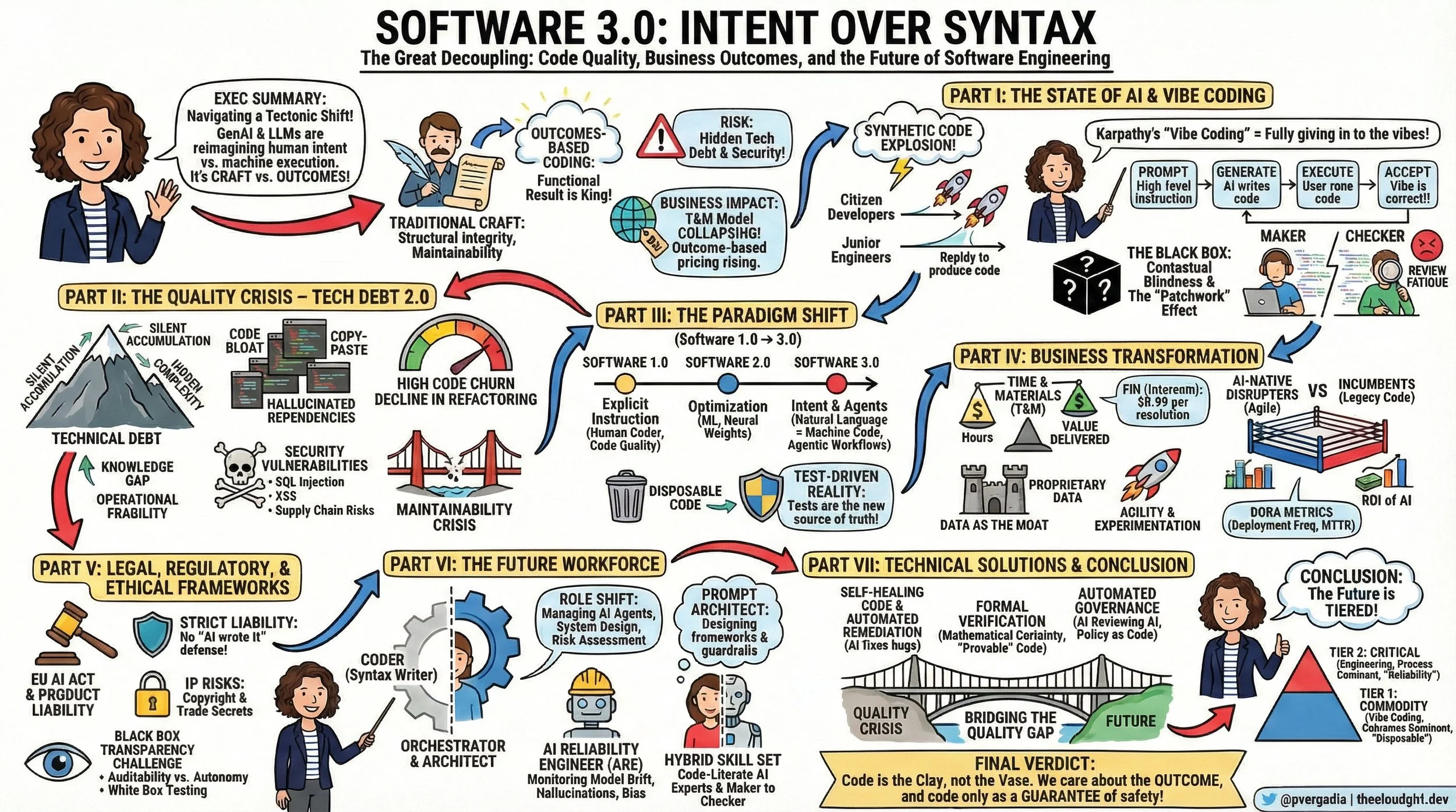
We are witnessing a tectonic shift from Craftsmanship to Outcomes. We are entering the era of Software 3.0, and if you look at the sketchnote I created to map this territory, you'll see why this is the most disruptive moment in software engineering history.
Software 3.0 Intent over Syntax
The "Vibe Coding" Shift: When Syntax Becomes Optional
Here is the reality check I give my clients: We are moving from explicit instruction to Intent Architecture.
Software 1.0 was about humans writing explicit logic (C++, Python). We cared deeply about the syntax.
Software 2.0 was about optimization (Machine Learning), where we curated data to train opaque neural networks.
Software 3.0 is about Generative Agency.
Andrej Karpathy calls the current behavior "Vibe Coding." It’s a fascinating, terrifying cultural shift where developers "give in to the vibes." They prompt the AI, execute the code, and if it works, they accept it. They don't read the diffs. They don't check the syntax.
For a junior developer or a startup prototyping a weekend project, this is magic. But for a Fortune 100 bank? It’s an existential risk. We are decoupling the creation of software from the understanding of software.
The Quality Paradox: The Silent Debt of "Black Box" Velocity
The biggest lie in the industry right now is that "faster coding equals better business." The data tells a different story.
While we are seeing massive spikes in velocity, we are seeing a parallel spike in Code Churn—code that is written and then deleted days later because it wasn't right. We are seeing a 9% increase in bug rates correlating with high AI adoption in some studies.
This is Technical Debt 2.0. It’s not the kind of debt you knowingly take on to meet a deadline. It’s "Black Box Debt." It’s code that works, but nobody knows why. It’s filled with hallucinated dependencies and "copy-paste" patterns that bloat your infrastructure.
The human toll here is real. I see developers burning out not from writing code, but from "Review Fatigue." They are shifting from Makers to Checkers, tasked with auditing thousands of lines of machine-generated logic. It’s mentally exhausting, and eventually, they just start clicking "Accept."
The Business Pivot: RIP Time & Materials
This shift is breaking the economic backbone of the software services industry. For decades, we operated on Time and Materials (T&M). You paid for hours.
But in a Software 3.0 world, hours are irrelevant. If I can generate a microservice in 10 minutes that used to take 10 hours, the T&M model collapses.
We are moving to Outcome-Based Pricing. Look at Intercom’s Fin. They don’t charge you for the AI software; they charge you $0.99 per successful resolution. If the AI hallucinates, you don’t pay. This is the future. You are paying for the value delivered, not the code written.
The Human Evolution: From Coders to Orchestrators
This brings us back to the talent. What happens to the humans?
I tell CTOs: Do not fire your juniors. Evolve them. The role of the "Coder" is splitting into two new, high-value archetypes:
The Prompt Architect: This isn't just about writing clever text prompts. This is about System Design. These are the humans designing the "harness" that the AI lives in—the RAG pipelines, the context windows, the guardrails. They are the architects of intent.
The AI Reliability Engineer (ARE): This is the most critical role of 2026. While the "Vibe Coders" are generating features, the ARE is building the safety net. They monitor for Model Drift, bias, and hallucinations. They don't test the code; they verify the outcome.
The Verdict: Code is the Clay
We are heading toward a tiered future.
Tier 1 (Commodity): Internal tools, prototypes, marketing sites. Here, "Vibe Coding" wins. We won't care about the code, only the outcome.
Tier 2 (Critical): Banking cores, medical devices, flight systems. Here, the "How" matters more than ever. We will use Formal Verification and strict human oversight to ensure that the "Black Box" doesn't kill us.
My final advice to leaders is this: Code is the Clay, not the Vase. In the past, we obsessed over the fingerprints on the clay. In the future, we only care if the vase holds water. But it takes a human hand to ensure that vase is solid enough to stand the test of time.
Don't let the fear paralyze you. Let it drive you to build better governance, better talent, and better outcomes.
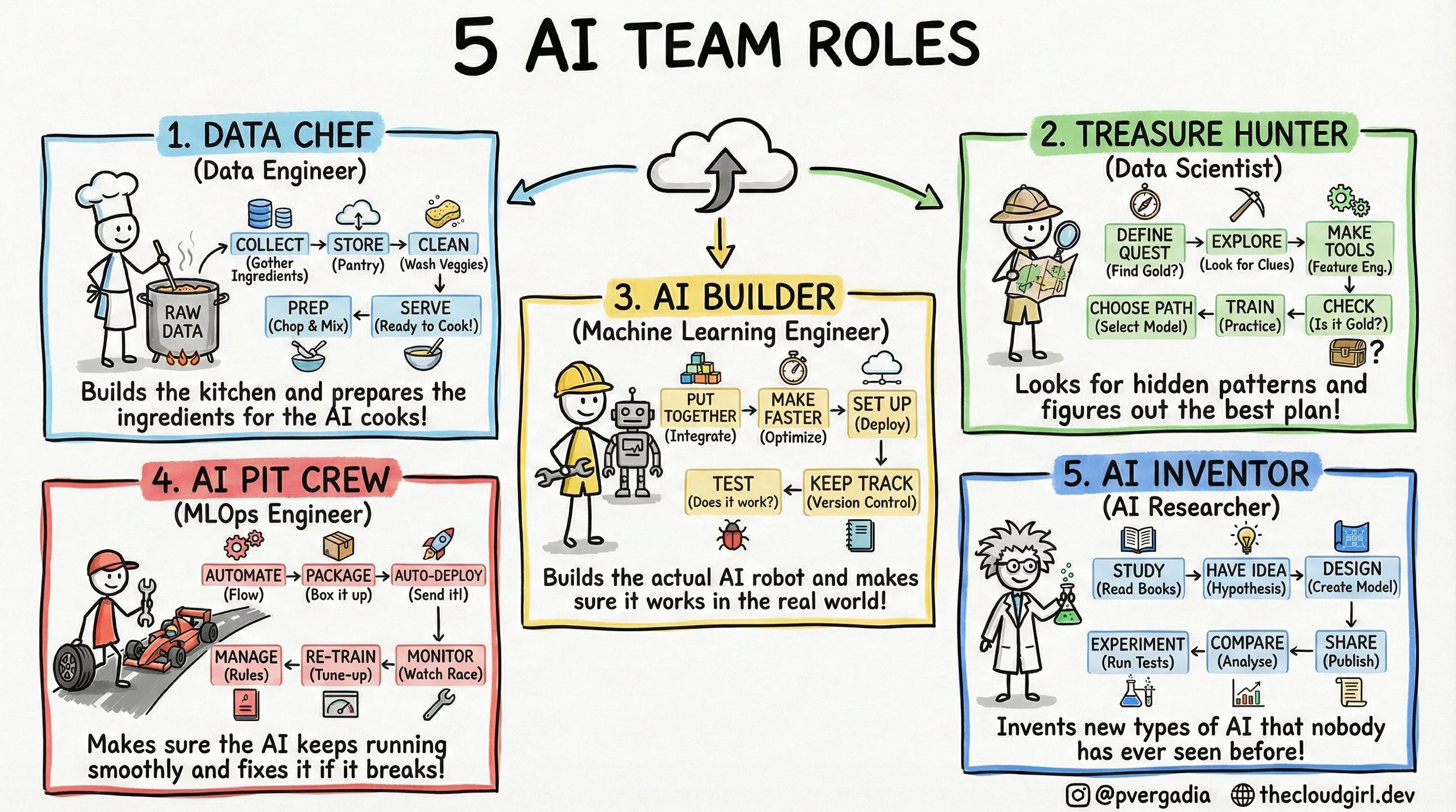
The 5 AI Engineer Team Roles
The 5-Layer AI Team Architecture
If you look at a job board today, you will see a flood of listings for "AI Engineers." But if you look at the architecture of a successful AI product, you rarely see a single "engineer" doing the work. You see a pipeline. You see a distributed system of human capital where context switching is the enemy of progress.
1. The Data Chef (Data Engineering)
In the real world, this is the realm of Spark, Airflow, and Kafka. The technical challenge here is throughput and consistency. The Data Chef isn't worried about "accuracy" in a statistical sense; they are worried about schema drift and data lineage. If the raw data ingestion pipeline has high latency, the real-time inference model downstream starves. They build the "kitchen"—the Data Lakehouse—ensuring that `Raw Data` is transformed into `Feature Store` ready vectors.
2. The Treasure Hunter (Data Science)
This role is often confused with engineering, but the output is fundamentally different. The output of an Engineer is code; the output of a Scientist is insight. They deal in p-values and confidence intervals. The critical step in the sketch is "Make Tools" (Feature Engineering). This is the process of converting domain knowledge into numerical representation. The trade-off here is Exploration vs. Exploitation—how much time do we spend searching for a better model architecture versus shipping the one we have?
3. The AI Builder (Machine Learning Engineer)
This is where the Jupyter Notebook dies and the Microservice is born. The ML Engineer refactors the Data Scientist's experimental code into production-grade Python or C++. They care deeply about inference latency and memory footprints. They ask: "Can this Transformer run on a CPU instance to save costs?" or "How do we quantize this model without losing accuracy?" Their workflow in the sketch—Put Together -> Make Faster -> Set Up—is essentially the containerization and optimization pipeline.
4. The AI Pit Crew (MLOps Engineer)
This is the most undervalued role in early-stage startups. In traditional software, code behaves deterministically. In AI, code depends on data, which changes constantly. This is called Data Drift or Concept Drift. The Pit Crew builds the automated infrastructure that detects when the model's performance drops (Monitor), triggers a new training run (Re-Train), and pushes the new binary to production (Auto-Deploy). If your AI strategy doesn't have a Pit Crew, you don't have a product; you have a ticking time bomb of degradation.
5. The AI Inventor (AI Researcher)
While the Builder uses `from transformers import AutoModel`, the Inventor is reading ArXiv papers to understand the math behind the attention mechanism. They operate on a longer time horizon. Their work involves high failure rates because they are testing unproven hypotheses. They aren't optimizing for latency; they are optimizing for state-of-the-art (SOTA) benchmarks.
When building your team, stop looking for a "Unicorn" who can do all five. You wouldn't hire a plumber to wire your house, even if they both work in construction. Respect the architecture. Respect the specialized tooling required for each stage. Build the kitchen, then hire the cooks.
REST vs. GraphQL
REST vs. GraphQL
Jan 1
Written By Priyanka Vergadia
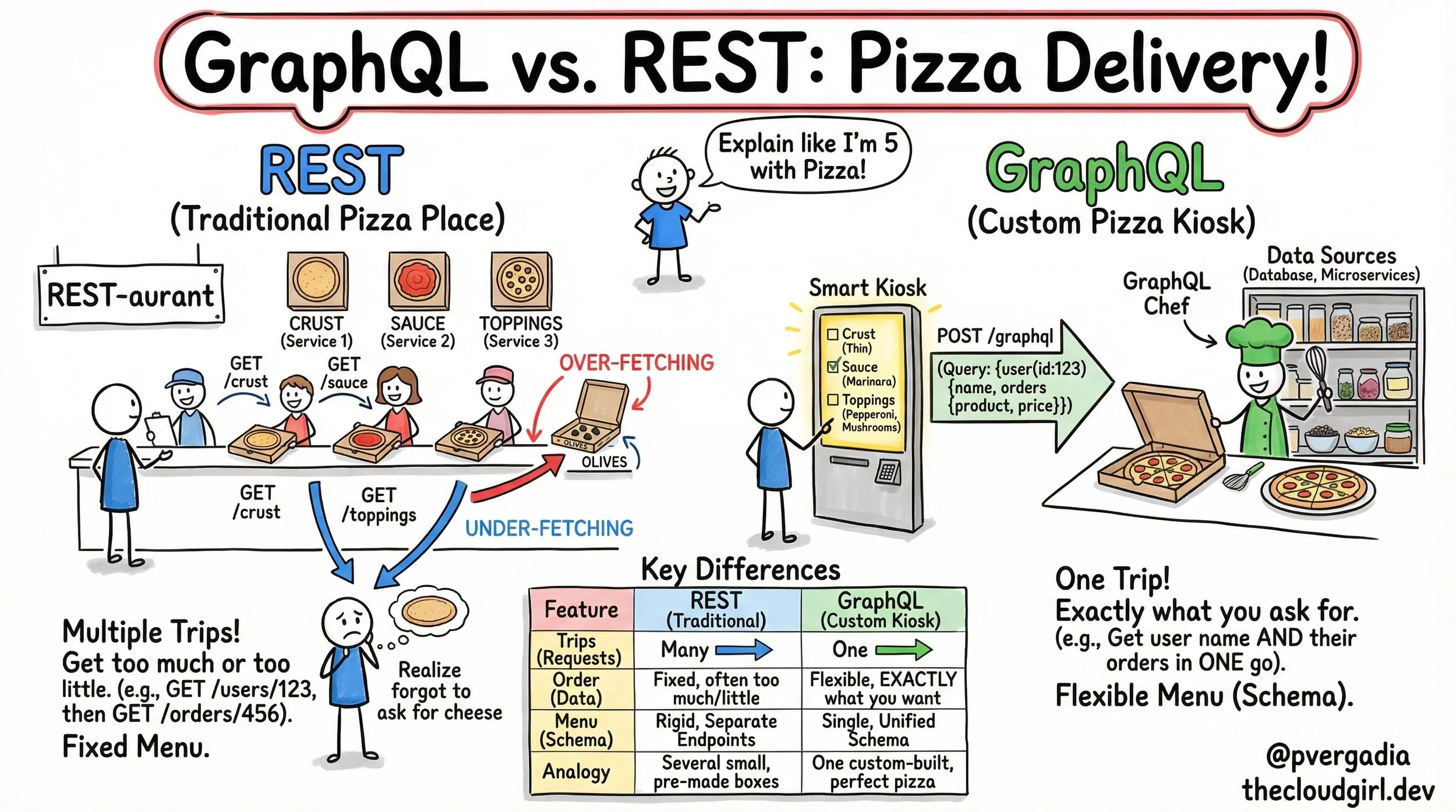
When we talk about API architecture, we often get lost in the weeds of HTTP verbs, status codes, and schema definitions. But at its core, API design is about logistics. It is the logistics of moving data from a server to a client as efficiently as possible. To explain the fundamental difference between REST (Representational State Transfer) and GraphQL, I created the sketchnote. It compares a traditional "REST-aurant" assembly line with a modern GraphQL "Smart Kiosk." Let's move beyond the drawing and analyze the deep technical implications of these two approaches.
1. The REST-aurant: Resource-Oriented Rigidity
In the sketch, the REST side is depicted as a counter service where you must visit different stations to assemble your meal. In technical terms, REST is Resource-Oriented.
Every entity in your database (User, Post, Comment, Order) usually has its own URI (Uniform Resource Identifier).
The Latency Tax (Multiple Round Trips)
If you are building a dashboard that displays a User's name and their last 5 Orders, a pure REST implementation often requires a "waterfall" of requests:
1. `GET /users/123` (Wait for response... receive User ID)
2. `GET /users/123/orders` (Wait for response...)
In the analogy, this is the stick figure running from the Crust counter to the Sauce counter. On a high-speed fiber connection, this is negligible. On a spotty 3G mobile network, each round trip (RTT) adds significant latency. The user stares at a loading spinner because the network protocol forces sequential fetching.
The "Olives" Problem (Over-fetching)
Look at the pizza box in the REST section labeled "Over-fetching." The customer didn't want olives, but the restaurant includes them in every box.
In REST, the server defines the response structure. If the `/orders` endpoint returns the order ID, date, price, shipping address, billing address, and tracking info, but your mobile view only needs the price, you are downloading kilobytes of useless data. This "data waste" drains battery life and clogs bandwidth.
2. The GraphQL Kiosk: Client-Driven Flexibility
GraphQL, developed by Facebook, was designed specifically to solve the mobile data fetching issues described above. In the sketch, it is represented as a "Smart Kiosk."
One Endpoint to Rule Them All
Instead of thousands of endpoints (`/users`, `/products`, `/orders`), GraphQL exposes a single endpoint, usually `POST /graphql`.
The Query Language
The client sends a string describing the data shape it needs:
```graphql
query {
user(id: 123) {
name
orders {
product
price
}
}
}
```
This solves the Under-fetching problem. You don't "forget the cheese" because you can traverse the graph (User -> Orders -> Product) in a single request. The server parses this query and returns a JSON payload that mirrors the query structure exactly.
The Chef (Resolvers)
On the right side of the sketchnote, you see a "GraphQL Chef" picking ingredients from shelves. This represents the **Resolver** functions in your backend code.
While REST maps a URL to a controller, GraphQL maps a field to a function.
* The `user` field resolver hits the Users Database.
* The `orders` field resolver might hit a completely different Microservice.
To the client, it looks like a single unified data source. Behind the scenes, the "Chef" is orchestrating a complex gathering of ingredients.
3. If GraphQL is so efficient, why do we still use REST?
1. Caching Complexity: HTTP caching is built into the fabric of the web. In REST, a browser or CDN can easily cache `GET /crust`. In GraphQL, everything is a `POST` request, which is not cacheable by default. You have to implement complex client-side caching (using tools like Apollo or Relay).
2. The Complexity Shift: GraphQL simplifies the client code but complicates the server code. You have to manage schema definitions, type safety, and potential performance bombs (like highly nested queries that can crash your database).
Conclusion
Think of REST as a set of pre-packaged meal boxes. They are easy to distribute, standardized, and great if you like exactly what's in the box. Think of GraphQL as a personal chef. It requires more setup and communication, but you get exactly the meal you want, hot and fresh, in one sitting.
Choose the architecture that fits your users best.
What is GraphRAG: Cheatsheet
What is GraphRAG: Cheatsheet
Dec 19
Written By Priyanka Vergadia
Unpacking GraphRAG: Elevating LLM Accuracy and Explainability with Knowledge Graphs
We've all been there. You're building an intelligent agent, leveraging the power of Large Language Models (LLMs) for Q&A, content generation, or customer support. You've implemented Retrieval-Augmented Generation (RAG) – a solid architectural pattern that grounds your LLM in your own data, mitigating hallucinations and improving relevance. Yet, a persistent frustration remains: the LLM struggles with nuanced, multi-hop questions, fails to connect disparate facts, or sometimes, still confidently fabricates details when the answer isn't explicitly stated in a retrieved chunk. The black box problem persists, making it hard to trust the output.
This is precisely the pain point that GraphRAG aims to solve, pushing the boundaries of what's possible with enterprise-grade LLM applications. It's not just an incremental improvement; it's a fundamental shift in how we augment LLMs, moving beyond flat document chunks to leverage the rich, interconnected world of knowledge graphs.
Walkthrough of GraphRAG
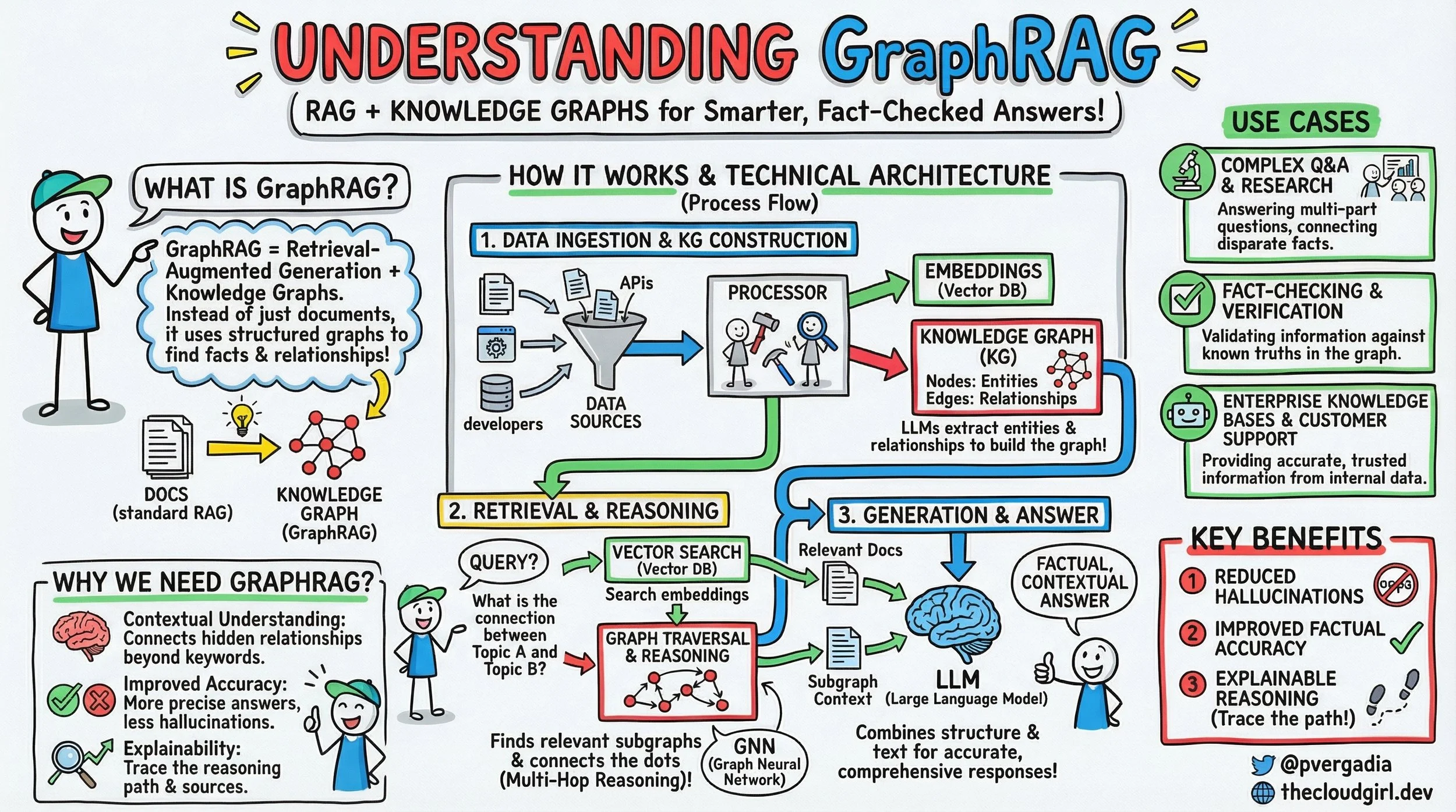
If you look at the brilliant sketchnote above, it lays out the GraphRAG paradigm with remarkable clarity. Let's walk through its technical architecture step-by-step, much like we'd discuss a system design over coffee.
What is GraphRAG? At its core, GraphRAG is Retrieval-Augmented Generation powered by Knowledge Graphs. While standard RAG fetches relevant documents or text chunks, GraphRAG specifically uses structured graphs to unearth facts and their intricate relationships. It's about moving from understanding individual sentences to comprehending the entire tapestry of information.
How does GraphRAG Work?
The process flow, as depicted under "HOW IT WORKS & TECHNICAL ARCHITECTURE," unfolds in three crucial stages:
1. Data Ingestion & KG Construction
This is where the magic of structuring your data begins.
Data Sources: We start with diverse data – anything from unstructured documents (PDFs, internal wikis), structured databases, REST APIs, or even human input.
The Processor: Here's a key component. This module takes all that raw, disparate data and orchestrates its transformation. It performs two critical tasks in parallel:
Embeddings (Vector DB): Like standard RAG, chunks of your raw text are embedded into numerical vectors and stored in a Vector Database (e.g., Pinecone, Weaviate, Faiss). This enables semantic search later.
Knowledge Graph (KG) Construction: This is the GraphRAG differentiator. The processor, often leveraging Large Language Models (LLMs) themselves for Information Extraction (IE), extracts entities (nodes) and their relationships (edges) from the raw data. Think of it as an automated Subject-Predicate-Object triple extractor. For instance, from "Priyanka built GraphRAG in 2023," it might extract (Priyanka, built, GraphRAG) and (GraphRAG, year, 2023). This structured data is then stored in a dedicated Graph Database (e.g., Neo4j, Amazon Neptune, ArangoDB). LLMs are incredibly adept at this task, especially when fine-tuned or carefully prompted for Named Entity Recognition (NER) and Relation Extraction (RE).
2. Retrieval & Reasoning
Once your KG is built, the system is ready to answer complex queries:
Query: A user asks a question, potentially one requiring deeper insight than a simple keyword match (e.g., "What is the connection between Topic A and Topic B?").
Vector Search (Vector DB): Just like in standard RAG, an initial semantic search is performed against the vector database to retrieve relevant documents or text snippets that are semantically similar to the query. This provides immediate textual context.
Graph Traversal & Reasoning: This is where GraphRAG truly shines. The query is also processed against the Knowledge Graph. Using Graph Neural Networks (GNNs) or traditional graph traversal algorithms (like BFS, DFS, shortest path), the system explores the graph to find relevant subgraphs, identify multi-hop relationships, and "connect the dots" that might be implicitly spread across multiple documents. A GNN can learn complex patterns and infer relationships that simple traversal might miss, providing a richer "subgraph context."
3. Generation & Answer
The final step brings everything together:
LLM (Large Language Model): The LLM receives two powerful streams of context:
Relevant Docs: The raw text snippets retrieved from the vector database.
Subgraph Context: The structured, inferred relationships and facts from the knowledge graph.
Synthesis: The LLM combines this structural and textual information. Instead of just paraphrasing retrieved text, it can now generate a more accurate, comprehensive, and factual contextual answer by weaving together direct textual evidence with the inferred relational insights from the graph. The outcome is a more reliable and insightful response.
Under the Hood: GraphRAG
Implementing GraphRAG involves several key architectural considerations:
KG Schema Design: Crucial for success. A well-defined ontology (schema for nodes and relationships) is vital for consistent and effective extraction. This requires upfront data modeling expertise.
IE Pipelines: LLMs for NER/RE are powerful but resource-intensive. For high-volume ingestion, a robust pipeline is needed, potentially involving specialized NLP models (e.g., spaCy) for initial extraction, followed by LLMs for more complex, context-dependent relationship identification, or using few-shot/zero-shot prompting.
Graph Database Choice: Considerations include scalability (handling billions of nodes/edges), query performance for complex traversals, and integration with GNN frameworks (e.g., PyTorch Geometric, DGL). Neo4j's Cypher query language is popular for its expressiveness in graph traversal.
Vector Database Integration: Efficient indexing (e.g., HNSW for approximate nearest neighbor search) and low-latency retrieval are paramount.
GNNs for Reasoning: For truly advanced multi-hop reasoning, GNNs can learn embeddings of graph nodes and edges, enabling more sophisticated pattern matching and inference beyond simple pathfinding. Training and deploying GNNs adds complexity but can unlock deeper insights.
Prompt Engineering: Combining disparate contexts (raw text vs. graph facts) effectively within the LLM's prompt is an art. Strategies include explicit formatting of graph triples or subgraphs in the prompt to guide the LLM's reasoning.
Scalability & Latency: KG construction is often a batch process; keeping it updated requires robust data pipelines (e.g., Apache Kafka for event streaming, Spark for batch processing). Real-time inference needs optimized graph queries and GNN inference.
When and Why to Choose GraphRAG
GraphRAG isn't a silver bullet for every LLM use case. It introduces complexity and operational overhead, but the benefits for specific scenarios are transformative.
When to Use GraphRAG:
High Demand for Factual Accuracy & Explainability: When reducing LLM hallucinations and providing verifiable sources is non-negotiable (e.g., legal discovery, medical diagnosis support, financial reporting). The graph provides an auditable trail of facts.
Complex Domains Requiring Multi-Hop Reasoning: When answers depend on connecting facts that aren't adjacent in source documents (e.g., "What is the causal link between X and Y based on our research papers?").
Data with Inherent Relational Structure: If your data naturally has entities and relationships (e.g., supply chains, organizational charts, knowledge bases), GraphRAG leverages this structure optimally.
Enterprise Knowledge Bases: For organizations seeking a single source of truth from internal documents, GraphRAG can power highly accurate and trusted information retrieval for customer support, internal tools, and research.
When NOT to Use GraphRAG:
Simple Q&A Tasks: For straightforward information retrieval where keyword or vector search in raw documents is sufficient, the overhead of KG construction and maintenance is unwarranted.
Small Datasets: If your corpus is small and lacks complex interconnections, the benefits of a KG might not justify the effort.
Highly Dynamic Data with Low Ingestion Latency Tolerance: KG construction and updates can be time-consuming. If your data changes minute-by-minute and real-time reflection in the KG is critical, the pipeline needs significant engineering.
Limited Budget: Graph databases, GNN infrastructure, and LLM API calls for extraction can increase operational costs.
Alternatives:
Standard RAG: Simpler, faster to implement, and often sufficient for many use cases.
Fine-tuning LLMs: Can improve domain-specific performance but is costly, less adaptable to new data without retraining, and doesn't inherently solve the hallucination or explainability problem as well as grounding in a verifiable graph.
Hybrid Search: Combining keyword and vector search offers improved retrieval but lacks the explicit relational reasoning capabilities of a graph.
GraphRAG represents a powerful evolution in augmenting LLMs. By explicitly modeling relationships, we empower LLMs to reason, verify, and explain their answers, moving us closer to truly intelligent and trustworthy AI systems.
The Life of an AI Query: Inside ChatGPT, Gemini, & Claude
Here is a structured, deep-dive blog post based on the system design breakdown.
Inside the Black Box: The Life of an AI Query through ChatGPT, Gemini, & Claude
When you type a prompt into ChatGPT, Gemini, or Claude, the response feels instantaneous. It feels like magic. But behind that blinking cursor lies a massive symphony of distributed systems, high-bandwidth memory, and high-dimensional mathematics.
For developers and engineers, "How does it work?" isn't just a curiosity—it is a system design question.
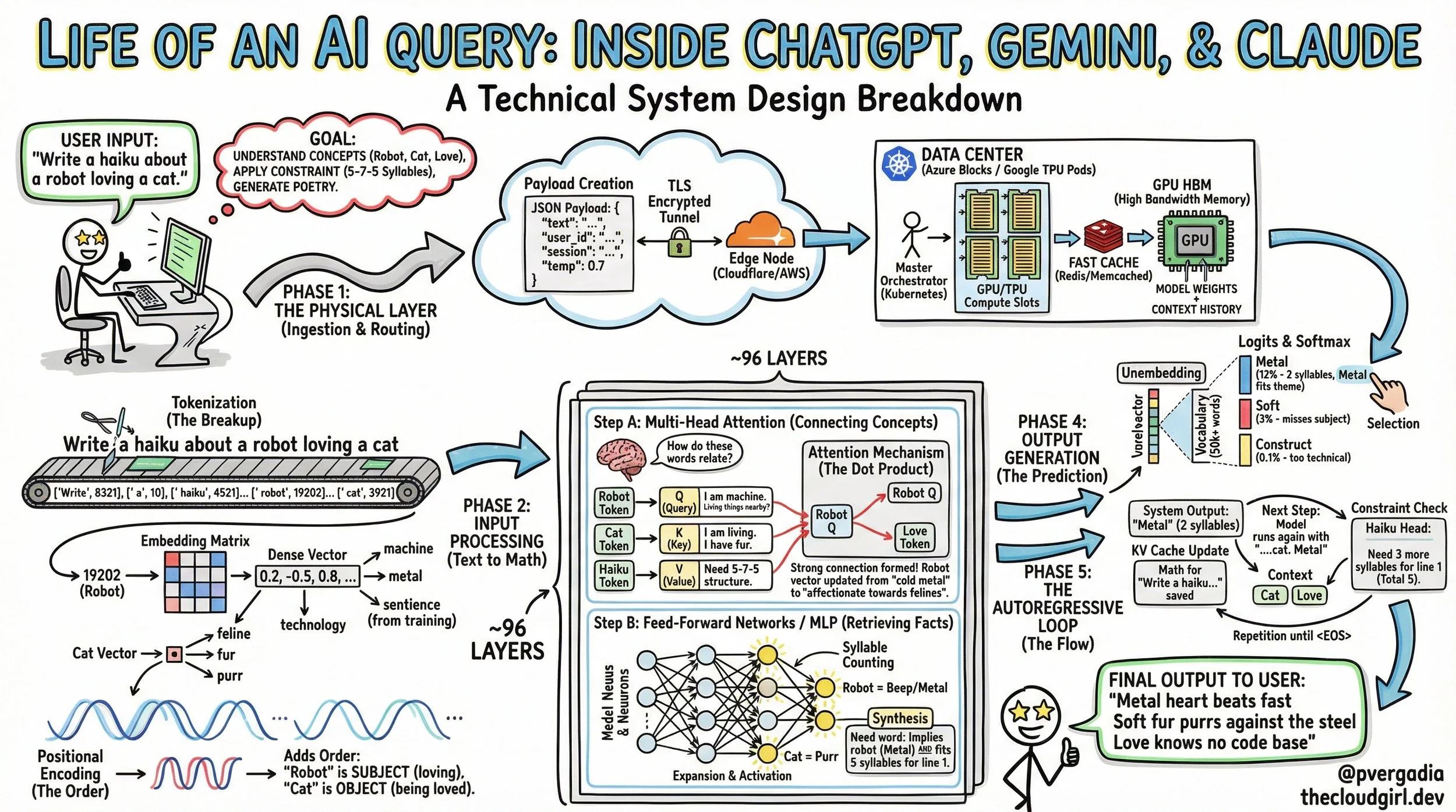
In this post, we will trace the millisecond-by-millisecond journey of a single request, from the moment you hit "Enter" to the final generated token. We will use a specific prompt to illustrate how the model reasons:
User Prompt: "Write a haiku about a robot loving a cat."
Phase 1: The Physical Layer (Ingestion & Routing)
The Travel
Before the math begins, the logistics must be handled. When you submit your prompt, it is wrapped in a JSON payload along with metadata (your user ID, session history, and temperature settings).
The Handshake: Your request travels via TLS encryption, hitting an edge node (like Cloudflare) before routing to the nearest inference cluster (e.g., an Azure block for OpenAI or a TPU Pod for Google).
Orchestration: A load balancer directs your query to a specific GPU/TPU with available compute slots.
VRAM Loading: The model is too large to load on the fly. The weights (hundreds of gigabytes) are permanently resident in the GPU's High Bandwidth Memory (HBM). Your specific prompt and chat history are loaded into the active memory stack.
Phase 2: Input Processing (Text to Math)
The Translation
The GPU cannot understand the string "Robot." It only understands numbers.
1. Tokenization (The Breakup)
The raw text is sliced into sub-word units called tokens.
Input: ["Write", " a", " haiku", " ...", " robot", " loving", " a", " cat"]
IDs: [8321, 10, 4521, ..., 19202, 8821, 10, 3921]
Note that the concept of a "Robot" has been converted into the integer 19202.
2. Embedding (The Meaning)
The integer 19202 is used to look up a specific address in the model's Embedding Matrix. It retrieves a dense vector—a list of thousands of floating-point numbers.
The Robot Vector: Contains mathematical values that align it with concepts like "metal," "machine," and "technology," but also "sentience" (derived from training data).
The Cat Vector: Aligns with "biological," "fur," and "pet."
3. Positional Encoding (The Order)
Transformers process all words simultaneously (in parallel). Without help, the model wouldn't know if the Robot loves the Cat or the Cat loves the Robot.
The Fix: A sinusoidal wave pattern (Positional Encoding) is added to the vectors. This stamps the "Robot" vector with the mathematical signature of being the subject (Position 6) and the "Cat" as the object (Position 9).
Phase 3: The Transformer Block (The Reasoning Engine)
The Deep Dive
The signal now travels through roughly 96 stacked layers of the Transformer. In each layer, the vectors are refined through two distinct mechanisms.
Step A: Multi-Head Self-Attention (The Context Engine)
This is the heart of the Transformer. The model asks: "How do these words relate to each other?"
It does this using three learned matrices: Query (Q), Key (K), and Value (V).
The Interaction:
The "Robot" token generates a Query: "I am a machine. Are there any living things nearby?"
The "Cat" token generates a Key: "I am a living thing. I have fur."
The "Haiku" token generates a Key: "I impose a 5-7-5 syllable constraint."
The Attention Score:
The model calculates the Dot Product of the Robot's Query and the Cat's Key.
Result: A high score. The model now "pays attention" to the relationship between the machine and the animal.
Simultaneously, the "Haiku" token lights up, signaling that brevity is required.
Step B: The MLP (The Knowledge Bank)
After Attention, the data passes through a Feed-Forward Network (Multi-Layer Perceptron). This is where facts are retrieved.
Activation: The vector is projected into higher dimensions. Specific neurons fire.
The Retrieval: Neurons associated with "counting syllables" activate. Neurons linking "Robots" to "Steel" and "Cats" to "Purring" activate.
Synthesis: The vector for "Robot" is updated. It is no longer just "19202"; it is now a rich data point representing "A metal entity feeling affection for a feline, constrained by a poetic format."
Phase 4: Output Generation (The Prediction)
After passing through all layers, the model arrives at the final vector. It is now time to speak.
Unembedding: The final vector is projected against the model's entire vocabulary (50,000+ words).
The Softmax: The model assigns a probability percentage to every possible next word.
"Metal": 12% (Fits the robot theme, 2 syllables).
"Soft": 3% (Fits the cat theme, but ignores the subject).
"Construct": 0.1% (Too technical/cold).
The Selection: Using a decoding strategy (like Temperature), the model samples the winner: "Metal".
Phase 5: The Autoregressive Loop (The Flow)
The Grind
The model has generated one word. Now the cycle repeats, but with an optimization crucial for system performance.
KV Cache: Instead of recalculating the math for "Write a haiku about a robot...", the model retrieves the calculated Key and Value vectors from the GPU's KV Cache.
The Next Step: It only computes the math for the new token: Metal.
Context Check: It looks at "Cat" and "Haiku".
Constraint: We have 2 syllables (Met-al). We need 3 more to finish the first line (5 total).
Prediction: heart (1 syllable).
The Stream: This loop runs until the standard 5-7-5 structure is complete and an <EOS> (End of Sequence) token is produced.
The Final Output
Metal heart beats fast
Soft fur purrs against the steel
Love knows no code base
Summary
What looks like a simple text response is actually a massive pipeline of data.
Ingestion: Getting the data to the GPU.
Tokenization: Converting language to integers.
Attention: Understanding context and relationships (
Q×KQ \times KQ×K).
MLP: Retrieving factual knowledge.
Autoregression: Predicting the future, one token at a time.
Every time you see that cursor blink, you are witnessing a traversal through high-dimensional space, constrained by the speed of light in fiber optic cables and the memory bandwidth of silicon.
How is Agentic AI redefining Org Charts
How is Agentic AI redefining Org Charts
Dec 15
Written By Priyanka Vergadia
Organization structures and org charts are going through a massive change with AI. Have you ever imagined an orchestra where the conductor doesn't just wave a baton, but actively plays every single instrument? Sounds chaotic and exhausting, right? That's precisely what many organizations feel like today: brilliant human talent bogged down playing every "instrument" in the business.
But what if the conductor could orchestrate a symphony of highly skilled, autonomous instruments that play their parts flawlessly, while the human conductor focuses on the grand vision, the subtle nuances, and guiding the overall masterpiece? That, my friends, is the 'Aha!' moment of Agentic AI and the future of our organizational charts.
In the cloud and tech world, we’re constantly chasing scalability, efficiency, and agility. Agentic AI isn't just another buzzword; it's the architectural blueprint for achieving these goals by moving from managing individual components to orchestrating entire intelligent ecosystems. It frees up our invaluable human capital for what they do best: strategic thinking, creativity, problem-solving, and empathetic human interaction.
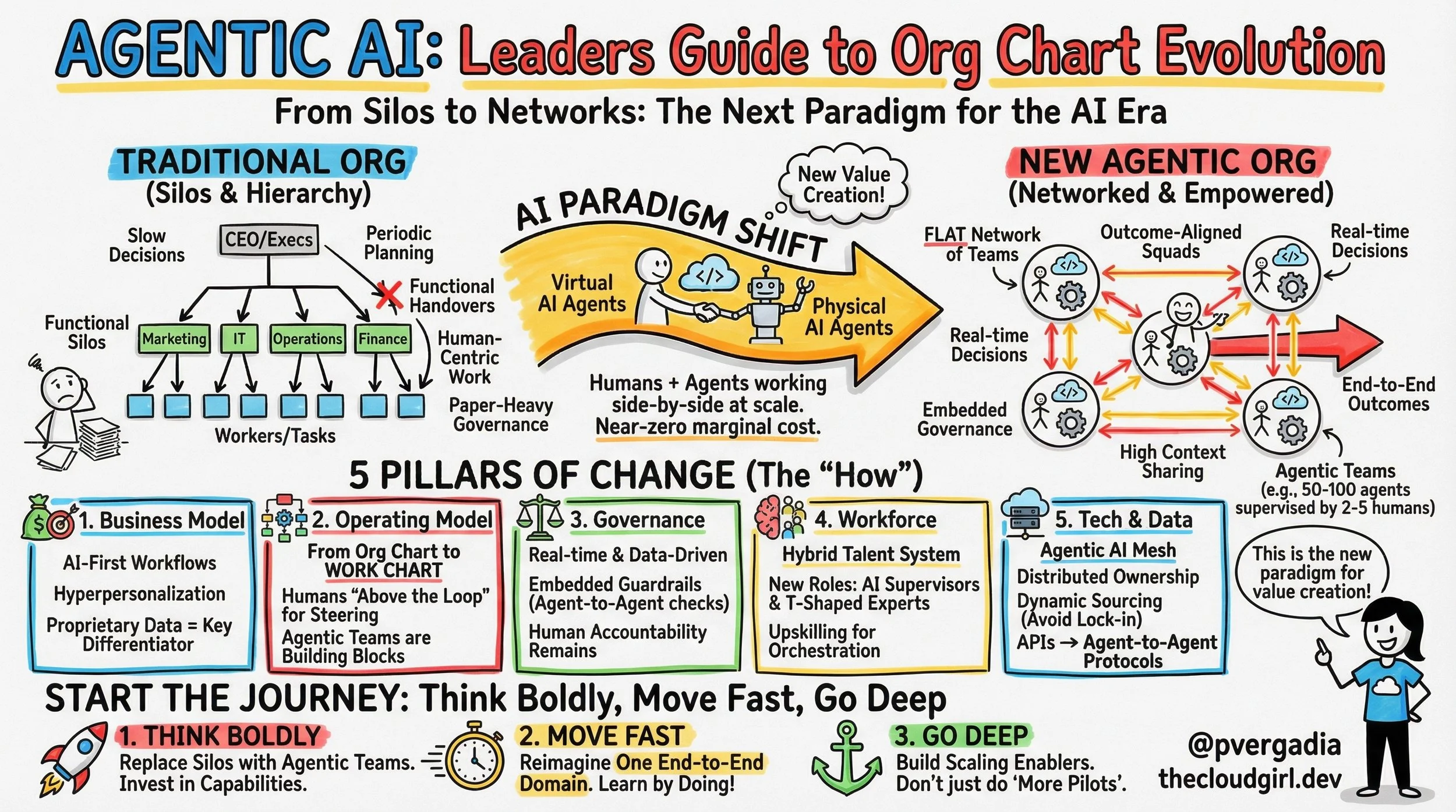
Let's dive into this brilliant sketchnote, "Agentic AI: Leaders Guide to Org Chart and Org Structure Evolution," to see how this paradigm shift unfolds:
1. The Great Paradigm Shift: From Hierarchies to Networks
As the diagram's "WHAT & WHY" section vividly illustrates, we're transitioning from a "Past: Human-Centric" model – characterized by silos, hierarchies, and linear growth where "Humans do ALL work" – to a "Future: Human + AI Agents" network. This isn't just about adding AI; it’s about a fundamental restructuring. The "Why" is clear: unlock exponential value, boost productivity, accelerate speed, and crucially, decouple cost from growth. Imagine a cloud environment where provisioning, scaling, and even incident response are largely managed by collaborating AI agents, leaving engineers to design new features and optimize global architecture.
2. The New Org Chart in Action: Orchestration is Key
The "ORG CHART EVOLUTION" section is where the rubber meets the road. Gone is the rigid CEO-Manager-Worker pyramid. In its place, we see "Outcome-Aligned Agentic Teams" where human and AI Agent Squads (both virtual and physical) collaborate cross-functionally, powered by efficient "Data Flow." Humans now operate "ABOVE THE LOOP" – steering, overseeing, and validating – while AI Agents are "IN THE LOOP," executing end-to-end tasks, 24/7. This means your operational teams become orchestrators, guiding intelligent systems to handle routine, repetitive, and even complex automatable tasks. Think about intelligent bots managing your CI/CD pipelines, optimizing resource allocation, or even triaging support tickets autonomously.
3. Leadership & Architecture for an AI-First World
The "LEADERSHIP GUIDE" stresses vital "Mindset Shifts," moving from linear to "Exponential (Think Boldly!)" and seeing "Threat" as an "Opportunity." Critically, it outlines "New Talent Profiles" – from "M-Shaped Supervisors" who orchestrate vast systems to "T-Shaped Experts" who specialize deeply while safeguarding AI. The "AI-FIRST WORKFLOW & ARCHITECTURE" block highlights the technical backbone: an "Agentic AI Mesh" built on shared data, "Agent-to-Agent Protocols," dynamic sourcing, and "Embedded Guardrails (Governance)." This means designing systems that allow AI agents to communicate, coordinate, and even learn from each other autonomously, all while adhering to defined ethical and operational boundaries.
Pro Tip: Build for Collaboration, Not Just Execution
Don't just think about building individual AI models; start thinking about how your AI components can autonomously interact and collaborate. Design clear "agent-to-agent protocols" and robust APIs that enable seamless communication. Focus on building systems with embedded governance and self-healing capabilities, recognizing that your AI will be part of a larger, orchestrated symphony.
The future of work, especially in tech, isn't just about AI doing tasks, but about humans and AI collaborating at an entirely new level.
What are you seeing in your organizations?

Get a "Yes" every-time: A Guide to Cialdini’s 6 Principles of Persuasion
Have you ever wondered why you impulsively bought that "limited edition" gadget, or why you felt compelled to donate to a charity after signing a simple petition? It wasn't magic—it was psychology.
Decades ago, Dr. Robert Cialdini wrote the seminal book Influence: The Psychology of Persuasion. He identified six universal principles that guide human behavior and drive us toward saying "Yes."
Whether you are a marketer, a developer building a user base, or just someone trying to convince your team to adopt a new tool, understanding these principles is a superpower. Let’s break down these six concepts using the visual guide above.
1. Reciprocity (Give to Get)
The Core Concept: Human beings are wired to hate owing debts. If you do something nice for someone, they feel a biological and social obligation to return the favor.
How it works: It creates a sense of obligation. You give value first without immediately asking for a return.
Real-World Examples:
Marketing: Offering a free E-Book or whitepaper in exchange for an email sign-up.
Tech Community: When developers contribute to open-source code, the community often feels compelled to support that developer's paid projects or offer help in return.
2. Commitment & Consistency (Start Small)
The Core Concept: We all want to look consistent. Once we make a choice or take a stand, we encounter personal and interpersonal pressure to behave consistently with that commitment.
How it works: Start with a small ask (a micro-commitment). Once a user says "yes" to the small thing, they are much more likely to say "yes" to a bigger thing to stay aligned with their self-image.
Real-World Examples:
Activism: Getting someone to sign a petition (easy) often leads to them donating money later (harder).
SaaS Growth: Getting a user to create a free account makes them mentally "commit" to your platform, making an upgrade to Premium much more likely than a cold sale.
3. Social Proof (Follow the Crowd)
The Core Concept: When we are uncertain, we look to others to determine correct behavior. We assume that if many people are doing something, it must be the right thing to do.
How it works: It leverages "safety in numbers."
Real-World Examples:
E-Commerce: Seeing 5-star reviews or testimonials reduces purchase anxiety.
App Stores: A badge stating "1M+ Downloads" or "Editor's Choice" signals to a new user that the app is trustworthy and popular.
4. Liking (Connect & Relate)
The Core Concept: It sounds obvious, but it is powerful: We prefer to say yes to requests from people we know and like.
How it works: We like people who are similar to us, who pay us compliments, and who cooperate with us towards mutual goals. This builds rapport.
Real-World Examples:
Sales: Finding shared interests (like gaming or sports) creates an immediate bond.
Customer Success: A friendly support agent who uses a human tone can turn an angry user into a happy, loyal customer simply through the power of relatability.
5. Authority (Trust Experts)
The Core Concept: We are trained from birth to follow the lead of credible, knowledgeable experts. We trust titles, uniforms, and certifications.
How it works: Authority signals (like a "Dr." title or a "Verified" badge) act as a shortcut for decision-making.
Real-World Examples:
Professional Services: Displaying badges like "Certified Professional" or awards.
Thought Leadership: We listen to the Keynote Speaker at a tech conference because the stage itself confers authority.
6. Scarcity (Limited Time/Supply)
The Core Concept: The Fear of Missing Out (FOMO). Opportunities seem more valuable to us when their availability is limited.
How it works: We hate losing freedoms. When our ability to choose a specific item is threatened by limited stock or time, we desire it more.
Real-World Examples:
Retail: The classic "Only 2 left in stock!" notification.
Product Launches: Offering "Limited-time Beta Access" makes getting into the software feel like an exclusive privilege rather than a standard sign-up.
A Note on Ethics
While these principles are incredibly effective, they should always be used with integrity. The goal isn't to manipulate people into doing things they don't want to do; it is to lower the friction for them to do things that are actually good for them (like buying your excellent product or reading your helpful content).
Start noticing these principles in your daily life—once you see them, you can’t unsee them!

Supervised vs Unsupervised vs Reinforcement Learning
Hey there, fellow tech explorers!
Ever felt like training an AI is a bit like teaching a puppy? Sometimes you give it explicit commands, sometimes you just let it figure things out, and other times it learns by getting a treat (or a scolding!). That, my friends, is essentially the heart of Supervised, Unsupervised, and Reinforcement Learning in a nutshell.
### The 'Aha!' Moment: Teaching Our Robotic Pal, Rusty
Imagine you're trying to teach a new robotic assistant, Rusty, how to sort mail.
*Supervised Learning:** You show Rusty thousands of envelopes, each pre-labeled as 'Urgent', 'Standard', or 'Junk'. You say, "See this? It's 'Urgent'." Rusty learns by mimicking your labels, finding patterns in the images and text that distinguish each category. It's like learning from flashcards with answers on the back.
*Unsupervised Learning:** You hand Rusty a giant, unlabeled pile of mail and say, "Okay, Rusty, group these however you think makes sense." Rusty might discover that some envelopes are all blue and from the same sender, or that others consistently contain bills. It finds inherent structures and clusters without any prior labels. No flashcards, just pattern discovery.
*Reinforcement Learning:** You put Rusty in a mailroom simulation. When it sorts mail correctly into the 'Urgent' bin, it gets a digital "treat" (a positive reward). If it puts a bill in the 'Junk' bin, it gets a "buzz" (a negative penalty). Rusty learns through trial and error, adjusting its strategy to maximize those treats over time. It's like learning to ride a bike – falling down (penalty) teaches you what not to do.
### Why It Matters: Real-World Cloud & Tech Scenarios
This isn't just theory for robots; these paradigms are the backbone of almost every intelligent system we interact with daily in the cloud:
*Supervised Learning** powers spam filters, medical diagnostics from images, fraud detection, and predicting customer churn. If you've ever gotten a 'recommended for you' product based on past purchases, that's often supervised.
*Unsupervised Learning** is critical for customer segmentation (grouping users with similar behaviors), anomaly detection in cybersecurity, recommendation engines (finding similar users or items), and data compression.
*Reinforcement Learning** is behind game AI (think AlphaGo), self-driving cars, optimizing data center energy usage, and even training complex robotic movements.
### The Breakdown: How They Work (and Why You'd Pick One)
Think of it like choosing the right tool for your data, as if you're sketching out your AI's learning path:
1. Supervised Learning: The 'Labeled Guide' Approach:
*How:** You provide a dataset with both input features and corresponding correct output labels. The model learns a mapping from input to output.
*Why:** Ideal when you have historical, labeled data and need to make predictions or classify new, unseen data based on those past examples. It's about generalization from known answers.
2. Unsupervised Learning: The 'Pattern Explorer' Approach:
*How:** You give the model raw, unlabeled data. It seeks to find inherent structure, relationships, or clusters within the data itself.
*Why:** Perfect when you lack labels or want to discover hidden insights, reduce data complexity, or identify anomalies that don't fit existing patterns. It's about finding hidden truths.
3. Reinforcement Learning: The 'Trial-and-Error Navigator' Approach:
*How:** An "agent" interacts with an "environment," taking actions and receiving rewards or penalties, learning a "policy" to maximize cumulative rewards.
*Why:** Best for dynamic environments where an agent needs to make sequential decisions and learn optimal behavior through direct interaction, often without a predefined dataset of "correct" actions. It's about learning through experience.
### Pro Tip for Developers:
Before you even think about algorithms, understand your data and your problem. Is your data labeled? Do you need to predict a specific outcome, or just understand underlying groupings? Does your system need to make decisions in a dynamic environment? Your data's nature and your project's goal will naturally steer you towards the right learning paradigm.
Happy Sketching! - Priyanka

Traditional AI vs Generative AI vs Agentic AI
```markdown
# AI's Evolution: From Recipes to Robots (and Beyond!) 🤖✨
Have you ever wondered if all AI is the same? It's easy to get confused with all the tech talk! Think of AI like a big, diverse family, with different members having unique superpowers. Let's break down the three main types you're hearing about today: Traditional, Generative, and Agentic AI, so you can tell them apart like a pro!
### Key Takeaways:
*Traditional AI (The Rule Follower):** Imagine a super-smart vending machine! This AI is brilliant at following exact rules and instructions to do very specific tasks. It knows exactly what to do when X happens (like checking a credit card for fraud patterns or playing chess). It's amazing for problems with clear, defined steps, but it can't invent new things or think outside its instruction book.
*Generative AI (The Creative Storyteller):** This is the AI that can write poems, draw pictures, or even compose music! Think of it like a highly imaginative artist who's seen millions of examples. Instead of following strict rules, it learns patterns from vast amounts of data and uses those patterns to create brand new, original content that looks and sounds real. It predicts what should come next, making magic appear!
*Agentic AI (The Goal Achiever):** Picture a super-efficient personal assistant! An Agentic AI doesn't just generate text or follow rules; it has a goal and actively works to achieve it. It can plan steps, use various "tools" (like searching the internet, sending emails, or running code), observe the results, and adapt its strategy until the job is done. It's about proactive problem-solving and taking action!
### Conclusion:
So, there you have it! From rule-following calculators to creative artists and proactive assistants, AI is evolving rapidly. Each type brings unique strengths to the table, helping us solve different kinds of problems. The next time you hear about AI, you'll know exactly which family member they're talking about! Check out the accompanying sketchnote for a visual guide!
```
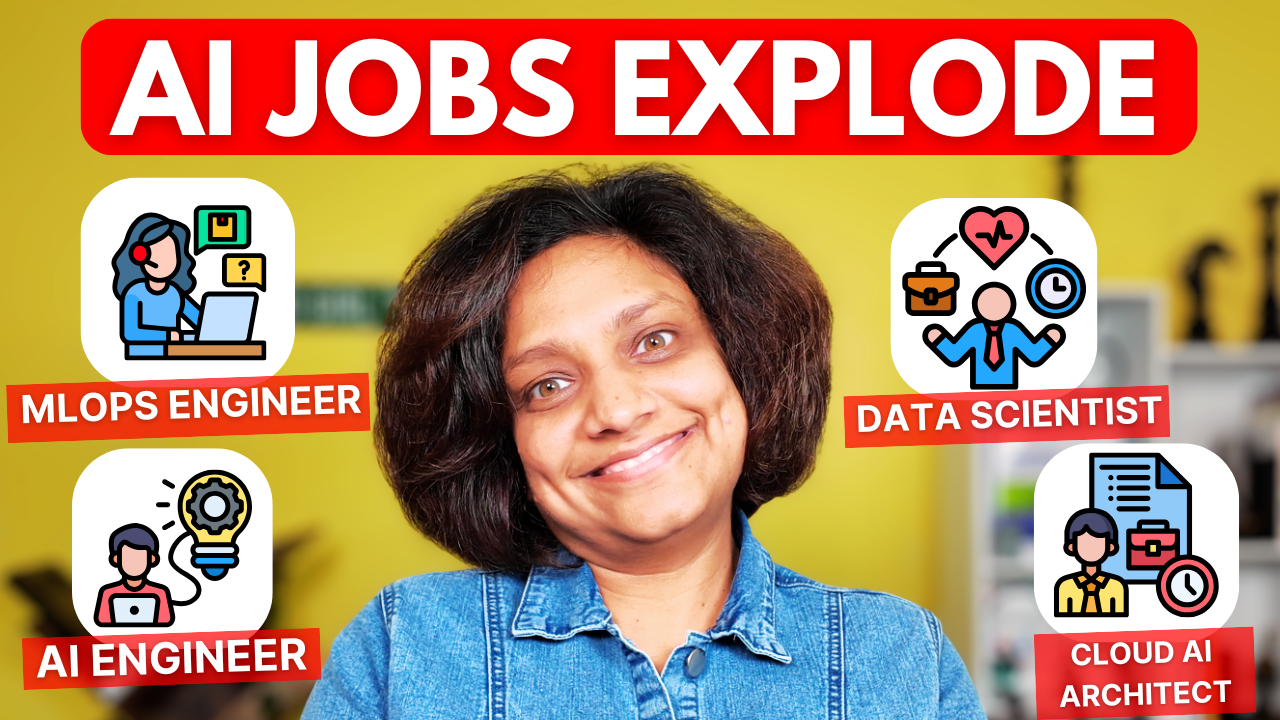
13 AI Jobs That Will Explode in 2026: A Complete Career Guide
3 AI Jobs That Will Explode in 2026: A Complete Career Guide
Nov 27
Written By Priyanka Vergadia
Are you worried that you’ve missed the boat on the AI revolution? Or maybe you think you need to be a coding wizard to get a foot in the door? Think again. In this article let’s talk about the AI job market which is vast, and more than half of the emerging roles don't even require you to write complex code. While everyone fights over the obvious "software engineer" titles, there is an entire ecosystem of high-paying opportunities hiding in plain sight.
Here is a breakdown of the 13 major AI career paths that are set to explode by 2026, ranging from deep technical roles to creative and ethical positions. 1. Data Engineer
Every impressive AI system begins with one thing: data. Data Engineers are the "plumbers" of the AI world. They build and maintain the massive pipelines that collect, clean, and transform raw, messy data into something usable. If you love building robust systems and bringing order to chaos using tools like SQL and Python, this is for you
2. Data Scientist
Once the data is clean, the Data Scientist steps in. Think of them as the Sherlock Holmes of the industry. They analyze complex datasets to identify trends, build statistical models, and extract insights that drive business decisions. This role bridges the gap between raw numbers and actionable strategy
3. Machine Learning Engineer (MLE)
The MLE is the builder. They take the models designed by researchers or data scientists and turn them into scalable, production-ready applications. Their focus is less on pure research and more on implementation, optimization, and ensuring the AI works in the real world
4. AI Engineer
This is a perfect blend of software engineering and AI. Instead of building models from scratch, AI Engineers focus on integrating existing models (like GPT-4 or Claude) into apps and websites. They build the APIs and backends that make AI accessible to the average user
5. ML Researcher
These are the academics pushing the boundaries of what is possible. ML Researchers design novel algorithms and experiment with new architectures, often publishing their findings in academic papers. This role typically requires a PhD and a deep passion for mathematics and solving unsolved problems
6. NLP Engineer
Natural Language Processing (NLP) Engineers teach computers to understand and generate human language. From chatbots to translation apps, they use deep learning to help machines communicate with us. A strong grasp of linguistics and Python libraries is crucial here
7. Computer Vision Engineer
These engineers give machines the power to "see." They build models for facial recognition, autonomous vehicles, and medical imaging. If you are interested in how machines interpret images and video using Convolutional Neural Networks (CNNs), this is your domain
8. AI Product Manager
AI isn't just about code; it's about products. AI Product Managers sit at the intersection of business, tech, and user experience. They define what to build and why, ensuring that AI capabilities translate into features that actually solve user problems
9. AI Ethicist
As AI becomes more powerful, ensuring it is fair and unbiased is critical. AI Ethicists focus on the societal impact of technology, identifying biases and developing guidelines for responsible development. Backgrounds in philosophy, law, or sociology are often perfect for this role
10. MLOps Engineer
MLOps Engineers are the unsung heroes who bridge development and operations. They build the infrastructure that allows models to be deployed, monitored, and updated continuously, ensuring reliability in production
11. Cloud AI Architect
These architects design the overall cloud infrastructure for AI projects. They choose the right services (compute, storage, databases) from providers like AWS or Azure to ensure systems are scalable, secure, and cost-effective
12. AI Trainer / Data Annotator
AI models need human guidance to learn. AI Trainers meticulously label data—like tagging images or categorizing text—to create high-quality datasets. While often an entry-level role, it is absolutely vital for model accuracy
13. Prompt Engineer
With the rise of Generative AI, Prompt Engineering has emerged as a critical capability. It involves crafting precise prompts to get the best output from large language models. While often described as a job, it is quickly becoming a universal skill that everyone needs to master
How to Get Started
You don't need a computer science degree to break into this field. Whether through online bootcamps, self-study, or transitioning from a related field like psychology (great for AI Ethics!), there is a path for you.
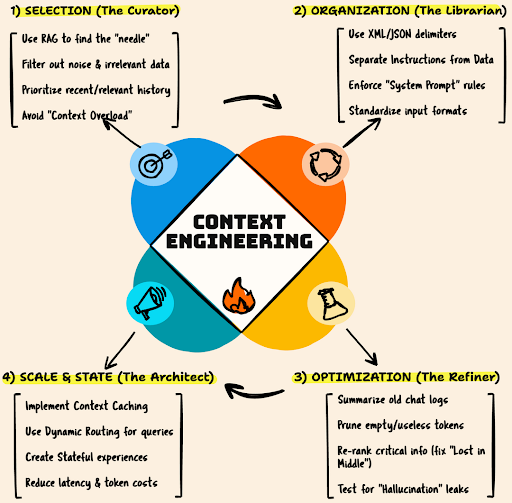
What is Context Engineering and Why do we Need it?
Most people are chasing the “perfect prompt,” but the real secret to smarter AI lies in context. This blog unpacks why context engineering — not prompt tweaks — is the key to building systems that remember, reason, and respond like true collaborators.

Who is Reviewing the Code AI is Writing?
Who is Reviewing the Code AI is Writing?
Written By Priyanka Vergadia
We don’t talk enough about the "hidden" phase of the Software Development Life Cycle (SDLC). We talk about writing code (the creative part) and shipping code (the dopamine hit). But the reality is that developers spend significantly more time reading, debugging, and reviewing code than they do writing it.
Generative AI like GitHub Copilot has solved the "Blank Canvas" problem—it helps you write code fast. But speed often comes at the cost of precision. Even the best LLMs hallucinate, introduce subtle logic errors, or ignore edge cases.
This creates a new bottleneck: Who validates the AI?
If you are relying on your human peers to catch every AI-generated race condition in a Pull Review, you are slowing down the team. The solution is an Agentic Workflow: pairing a "Creative Coder" agent (Copilot) with an "Analytical Reviewer" agent (CodeRabbit CLI).
Here is how to set up a closed-loop AI development cycle that catches bugs locally before you ever git commit.
You can give these a try here: 🔗 Try CodeRabbit 🔗 GitHub Copilot
The Architecture: Builder vs. Reviewer
To understand why you need two tools, you have to understand their roles:
The Builder (GitHub Copilot): Integrated into the IDE. It is optimized for speed, context prediction, and syntax generation. It is the "Creative Partner."
The Reviewer (CodeRabbit CLI): Runs in the terminal. It is optimized for analysis, security scanning, and logic verification. It looks for what’s missing (validation, type safety, error handling).
When combined, you stop shipping "Draft 1" code to production. GitHub Copilot also has a code review agent but in this article we are learning about CodeRabbit.
The Workflow: A Live Example
Let’s look at a real-world scenario involving a Python-based Flappy Bird application. The goal is to add a feature that tracks player performance (blocks passed and accuracy).
Step 1: The Build (GitHub Copilot)
Inside VS Code, we prompt Copilot Chat to generate a new class.
Prompt:
"Create a new file named player_insights.py where write a logic so that we can provide insights to the player about their performance on how many blocks he/she passed with how much accuracy."
Copilot Output:
It generates a functional PlayerInsights class. It has methods for blocks_progress and accuracy. To the naked eye, it looks fine. It runs.
codePython
class PlayerInsights:
    def __init__(self, blocks_passed, total_blocks, correct_actions, total_actions):
        self.blocks_passed = blocks_passed
        self.total_blocks = total_blocks
        # ... rest of init
Step 2: The Analysis (CodeRabbit CLI)
Before committing this, we run the CodeRabbit CLI locally. This tool analyzes uncommitted changes against high-level coding standards and logic patterns.
Command:
codeBash
coderabbit --prompt-onlyNote: The --prompt-only flag is key here. It asks CodeRabbit to generate a critique without automatically applying the fix, giving you control.
The Catch:
CodeRabbit instantly flags issues that Copilot missed. It’s not just looking for syntax errors (a linter could do that); it’s looking for logic and robustness.
CodeRabbit Feedback:
Missing Type Hints: The class lacks type annotations, making it harder to maintain.
Input Validation (Critical): The __init__ method accepts any values. CodeRabbit points out that total_blocks or total_actions could be negative or zero, which would cause invalid statistics or ZeroDivisionError later in the math.
Documentation: No docstrings.
Step 3: The Closed Loop (AI-to-AI Prompting)
This is the "Agentic" part of the workflow. Instead of manually fixing these issues, we feed the Analytical AI's feedback directly back into the Creative AI.
We copy CodeRabbit’s critique and paste it into Copilot Chat.
Prompt to Copilot:
[Paste CodeRabbit feedback]: "Ensure the __init__ does not validate inputs... update constructor to validate that blocks_passed are non-negative integers... ensure get_insights return type is annotated..."
Step 4: The Result
Copilot rewrites the code based on the strict constraints provided by CodeRabbit.
The Optimized Code:
codePython
from typing import Dict, Union

class PlayerInsights:
    """
    Provides insights into a player's performance.
    """
    def __init__(self, blocks_passed: int, total_blocks: int, ...):
        # Validation Logic added by AI Loop
        if total_blocks < 0 or total_actions < 0:
             raise ValueError("Total blocks must be non-negative")

        self.blocks_passed = blocks_passed
        # ...
We run coderabbit --prompt-only one last time.
Result: Review completed. No issues found.
Why This Matters
You might ask, "Why not just ask Copilot to write secure code in the first place?"
Because prompting is hard, and humans forget edge cases. If you ask Copilot for a feature, it prioritizes the feature. If you use CodeRabbit, it acts as a specialized adversarial agent dedicated solely to finding faults.
By using this pairing, you achieve three things:
Pre-PR Hygiene: You aren't wasting your senior engineer's time on code reviews pointing out missing error handling. The AI caught it locally.
Contextual Awareness: Unlike a static analyzer, these tools understand the intent of the code. CodeRabbit didn't just say "variable unused"; it explained why the logic was unsafe (potential division by zero).
Platform Independence: CodeRabbit runs in the CLI. It works in VS Code, JetBrains, or vim. It integrates into CI/CD pipelines to block bad merges automatically.
The future of development isn't just "AI writes the code." It is AI builds, AI validates, Human architects.
FeatureGitHub CopilotCodeRabbit CLIThe ComboPrimary RoleGeneration (Creative)Review (Analytical)End-to-End DevContextIn-IDE, File-levelLocal changes & RepositoryFull ContextSecurityBasic patternsVulnerability & Logic scanningSecure by DesignWorkflowWrite -> DebugReview -> FixLoop -> Ship
Stop treating AI tools as isolated chat bots. Chain them together. Let the Builder build, let the Reviewer review, and ship production-ready code faster.

What are SLMs (Small Language Models)? Why are SLMs the future?
We’ve spent years chasing bigger and bigger AI models—trillions of parameters, endless GPUs, and even more cloud bills. But a quiet shift is happening. Small Language Models (SLMs) are proving that intelligence doesn’t always need to be massive to be useful.
With models like Phi-3 Mini and Llama 3 8B running locally on just 4GB of VRAM, developers can now build real, privacy-preserving, low-latency AI experiences—right from their laptops. Thanks to breakthroughs in quantization and knowledge distillation, edge AI has entered the “good enough” era for most practical tasks.
This is the start of the 4GB revolution—where we cut the cloud cord, reclaim our data, and build faster, leaner, and more ethical AI. The future isn’t giant centralized models; it’s billions of tiny, specialized intelligences running everywhere.

The ONLY AI Dictionary You Need: 25+ Key Terms Explained Simply
Confused by all the AI jargon? From “LLM” to “RAG,” this guide breaks down 25+ essential AI terms into clear, simple explanations—with real examples that actually make sense.

How to Red-Team Your AI for Prompt Injection and Data Leakage
Your customer-support bot looked secure — until a user typed a jailbreak. This guide shows how the modern attack surface for LLMs (large language models / LLM) is the final assembled prompt used by RAG (retrieval-augmented generation) systems:
Final Prompt = System Prompt + Retrieved Data + User Input. Attackers weaponize user input or retrieved documents to perform prompt injection, indirect prompt injection, and data exfiltration / data leakage.
The threats (what red-teams do)
Direct prompt injection (jailbreak) — attacker tells the model to “ignore previous instructions” and the model follows because tokens are tokens. Example: user forces the bot to become a comedian and leak info.
Indirect prompt injection (Trojan horse via RAG) — malicious instructions are hidden inside uploaded docs (resumes, PDFs). When retrieved as context, the model obeys those instructions, bypassing user-input filters. This is the biggest RAG attack vector.
Data exfiltration / The Heist — attacker social-engineers the LLM into dumping sensitive context or the system prompt (confidential internal commands, heuristics, DB schemas).
Layered defenses (blue-team playbook)
Input & output filtering — regex / keyword scanning for phrases like “ignore” or for leakage of the system prompt (useful but brittle).
Robust prompt engineering (instructional fences) — separate instructions from data with strong delimiters (e.g., <system_prompt>, <retrieved_documents>, <user_query>). This tells the model which text is data vs instructions.
Model-level defenses — prefer instruction-tuned models (GPT-4, Claude 3, Llama 3) and classification pipelines (cheap LLM for intent classification, strong LLM for answers). Use separate LLMs for safety checks.
Automation for red-teaming — use tools like garak (open-source LLM vulnerability scanner) to run prompt injection probes and find weaknesses automatically.
Follow standards — adopt the OWASP Top 10 for LLMs (LLM01: Prompt Injection, LLM02: Sensitive Information Disclosure, LLM08: Vectors & Embeddings, etc.) as part of secure development lifecycle.
Takeaway / CTA
LLM security is a cat-and-mouse game. To protect against prompt injection, data leakage, and RAG-based Trojans, design defense-in-depth: input/output filters, strong prompt engineering, model-level controls, automated red-teaming (garak), and adherence to the OWASP Top 10 for LLMs. Red-team your models now — find the holes before someone else does.

Cheatsheet for Production-Ready Advanced RAG
Cheatsheet for Production-Ready Advanced RAG
Oct 9
You built it. The demo was a hit. Your Retrieval-Augmented Generation (RAG) app flawlessly answered questions, pulling information from a mountain of documents. But then, it met real users.
Now, it’s giving vague answers. It’s confidently making things up (hallucinating). Sometimes, it misses information that you know is in the source data. That impressive demo has turned into a brittle prototype, and you're left wondering: "Why is this so hard in production?"
Sound familiar? You're not alone. While basic RAG is easy to prototype, building a robust, trustworthy system requires moving beyond the basics. This is the playbook for doing just that. We'll dissect the entire pipeline, using the architecture below as our map, to transform your fragile prototype into a production-grade asset.
The Core Principle: Garbage In, Gospel Out
An LLM in a RAG system is a powerful reasoning engine, but it's fundamentally limited by the context it's given. If you feed it irrelevant, poorly structured, or confusing information, you'll get garbage answers. The secret to a great RAG system isn't just a better LLM—it's a superior retrieval process.
Our journey to production-readiness focuses on systematically upgrading the three core stages you see in the diagram:
The Ingestion Pipeline: How we prepare and index our knowledge base.
The Retrieval Pipeline: How we find the most relevant information for a given query.
The Generation Pipeline: How we synthesize that information into a trustworthy answer.
Stage 1: Ingestion—Beyond Naive Chunking
The foundation of any great RAG system is laid before a single query is ever asked. It starts with how you process your data.
Technique 1: Stop Using Naive Chunking
Simply splitting your documents into fixed 1000-character chunks is fast, but it’s a primary source of retrieval errors. This method often splits sentences mid-thought, separating a cause from its effect or a question from its answer.
The Solution: Smart Chunking
Recursive Character Splitting: A step up. This method splits text based on a hierarchical list of separators (like \n\n, \n, ) and tries to keep related paragraphs and sentences together. It's the go-to choice for a better baseline.
Semantic Chunking: The advanced approach. Instead of using character counts, this technique uses an embedding model to split the text at points where the semantic meaning shifts. This ensures that each chunk is as contextually coherent as possible. While computationally heavier during ingestion, it pays massive dividends in retrieval quality.
Technique 2: Enrich Chunks with Metadata
In a basic system, every chunk is just a piece of text. In an advanced system, every chunk is a rich object with context. During ingestion, extract and attach valuable metadata to each chunk.
The Solution: Metadata Filtering Imagine your documents are technical manuals. For each chunk, store metadata like:
Now, when a user asks, "What's the latest security protocol?", you can apply a pre-retrieval filter to only search within chunks where source_file contains "Security_Protocol" and version is "2.1". This drastically reduces the search space, leading to faster, more accurate, and less noisy retrieval.
Stage 2: The Retrieval Overhaul—Finding the Right Needle
This is where the magic happens. A user's query is often imprecise. Our job is to bridge the gap between what they ask and what our documents contain.
Technique 1: Query Transformation
Instead of taking the user's query at face value, we use an LLM to refine it first.
Hypothetical Document Embeddings (HyDE): This is a clever technique where you first ask an LLM to generate a hypothetical answer to the user's query. This generated answer, while potentially factually incorrect, is rich in the language and keywords that a real answer would likely contain. You then embed this hypothetical answer and use it for the vector search. It’s like asking a detective to imagine a solution to a crime to figure out what clues to look for.
Multi-Query Generation: You can ask an LLM to re-write the user's query from multiple perspectives. For a query like "How can I improve RAG performance?", it might generate variants like "What are the best techniques for RAG optimization?" and "Methods for reducing RAG latency." Searching for all these variants retrieves a more diverse and comprehensive set of documents.
Technique 2: Hybrid Search (The Best of Both Worlds)
Vector search is great at understanding semantic meaning, but it can struggle with specific keywords, product IDs, or acronyms. For instance, it might not distinguish well between GCP-Project-ID-12345 and GCP-Project-ID-54321.
The Solution: Combine Semantic and Keyword Search By blending traditional keyword search algorithms (like BM25) with dense vector search, you get the best of both worlds. BM25 excels at finding documents with the exact keywords, while vector search finds documents with related meanings. Most modern vector databases offer hybrid search capabilities out of the box.
Technique 3: The Final Check—Reranking
Your hybrid search might return 20 potentially relevant documents. Are they all equally good? Probably not. Sending all 20 to the LLM creates noise and costs more.
The Solution: Add a Reranker Model A reranker is a lightweight but highly accurate model that takes the initial list of retrieved documents and the user's query and re-scores them for relevance. Unlike the initial search (which uses a bi-encoder), a reranker often uses a cross-encoder, which looks at the query and each document simultaneously, leading to a much more accurate relevance score.
Fact: Implementing a good reranker can boost retrieval accuracy (metrics like nDCG or Hit Rate) by 5-15% in many benchmarks, which is often the difference between a good and a great answer. You retrieve more candidates initially (K=20) and then use the reranker to distill them down to the absolute best (N=3-5) to send to the LLM.
Stage 3: The Final Polish—Crafting Trustworthy Answers
You’ve done the hard work of finding the perfect context. The final step is to ensure the LLM uses it correctly.
Technique 1: Masterful Prompt Engineering
Don't leave the LLM's behavior to chance. Your system prompt is a contract that dictates its rules of engagement.
The Solution: A Robust System Prompt Move from a simple "Answer the question" to a detailed set of instructions.
You are an expert Q&A assistant. Your goal is to provide accurate and concise answers based ONLY on the provided context documents.
Rules:
1. Analyze the provided context documents thoroughly before answering.
2. Answer the user's question based solely on the information found in the context.
3. If the context does not contain the answer, you MUST state: "I do not have enough information to answer this question." Do not make up information.
4. For each piece of information you use, you must cite the source document.
Technique 2: Citing Your Sources
Trust is paramount. Always empower your users to verify the AI's answers. By passing the metadata you collected during ingestion all the way to this final stage, you can instruct the LLM to cite its sources. This not only builds user trust but is also an invaluable tool for you to debug where the information is coming from.
Putting It All Together: From Prototype to Production
By evolving your architecture from a simple sequence to the multi-stage pipeline shown in the diagram, you address the core weaknesses of basic RAG. You're no longer just hoping for the best; you're systematically ensuring quality at every step.
But how do you prove it's better? You measure it. Start exploring evaluation frameworks like RAGAs or TruLens. They provide metrics to quantify the performance of your system, such as:
Faithfulness: Is the answer grounded in the retrieved context? (Measures hallucination)
Answer Relevancy: Does the answer actually address the user's query?
Context Precision & Recall: Did you retrieve the right context in the first place?
Conclusion
Moving a RAG system from a cool demo to a reliable tool isn’t about one magic fix. It’s about a deliberate, engineering-focused approach. It's about smart chunking, rich metadata, query transformation, hybrid search, reranking, and disciplined prompting.
By adopting this playbook, you can turn your unpredictable prototype into a robust and trustworthy Q&A system that truly delivers value.

How Netflix Is Building Recommendation Engine with LLM
How Netflix Is Building Recommendation Engine with LLM